Stage 10 · Security and specialised
OAuth 2.0 and OIDC
You’re building a photo-printing site. To print someone’s photos, you need to read the photos they keep in some cloud drive. You don’t own that drive, and you have no business knowing their password for it.
OAuth 2.0 is the answer to exactly that: let an app act on your data in another service, without that app ever seeing your credentials. OIDC is a thin layer bolted on top that answers a different question — who is this person — which OAuth on its own deliberately never answers.
Start with the thing everyone did first
Your print site has a text box: “enter your cloud drive username and password, and we’ll fetch your albums.”
This works. You store the credentials, log in as the user with a scripted browser session, scrape the album list, download the JPEGs. Users get their prints. Ship it.
Now let’s count what you just took on.
You hold plaintext (or reversibly-encrypted, which is the same thing) passwords for a service you don’t control. You can read their email if that account is a Google account. You can delete every file in the drive. Nothing in the protocol limits you to photos, because there is no protocol — you’re just being the user.
And the user has no way to take it back. The only revocation mechanism is “change your password”, which simultaneously logs them out of their phone, their laptop, and the four other integrations they set up. So they don’t do it. Your access is permanent by default.
Then two more things break. The drive provider turns on MFA, and your scripted login stops working entirely. And six months later you get breached, and the attacker doesn’t get your passwords — they get everybody’s cloud drive passwords.
This was common enough in 2007 to have a name: the password anti-pattern. Every problem in it comes from the same root cause. The user’s credential is a single all-or-nothing capability, and you handed the whole thing over.
What we actually want
List what a good answer would give us, in the user’s words:
- The print site should be able to read my photos and nothing else.
- I should be able to turn it off without touching anything else.
- The print site should never see my password, so a breach there can’t hurt my drive account.
- I should see a screen from the drive provider, not the print site, telling me what’s being asked for.
Every one of these says the same thing: we need a third credential that isn’t the password, minted by the drive provider, narrower than the password, and independently revocable. That credential is an access token, and OAuth 2.0 (RFC 6749) is the framework for getting one.
The four roles
The spec is careful about who’s who, and interviewers are too, because mixing them up is how people end up describing an insecure flow.
Resource owner — the human. “An entity capable of granting access to a protected resource.” The person whose photos these are.
Client — the print site. “An application making protected resource requests on behalf of the resource owner and with its authorization.” Note that “client” means the application, not the browser and not the user.
Authorization server — the drive provider’s login and consent system. It authenticates the user, shows the consent screen, and issues tokens.
Resource server — the drive provider’s photo API. It accepts tokens and serves bytes. It has no idea how the token was obtained.
The authorization server and resource server are often the same company but are almost never the same service. That separation is the whole point: one service is in the business of making trust decisions, the other is in the business of serving data and just checking a token.
One more distinction that decides which flow you can use. A confidential client is one “capable of maintaining the confidentiality of their credentials” — a server-side backend with a client secret in its environment. A public client is one that can’t: a single-page app, a mobile app, a desktop app. Anything that ships to the user’s device has no secrets, because the user’s device belongs to the user, and they can read it.
The Authorization Code flow, step by step
Here’s the flow the spec calls the authorization code grant, drawn with the two channels made explicit, because the two-channel structure is the design.
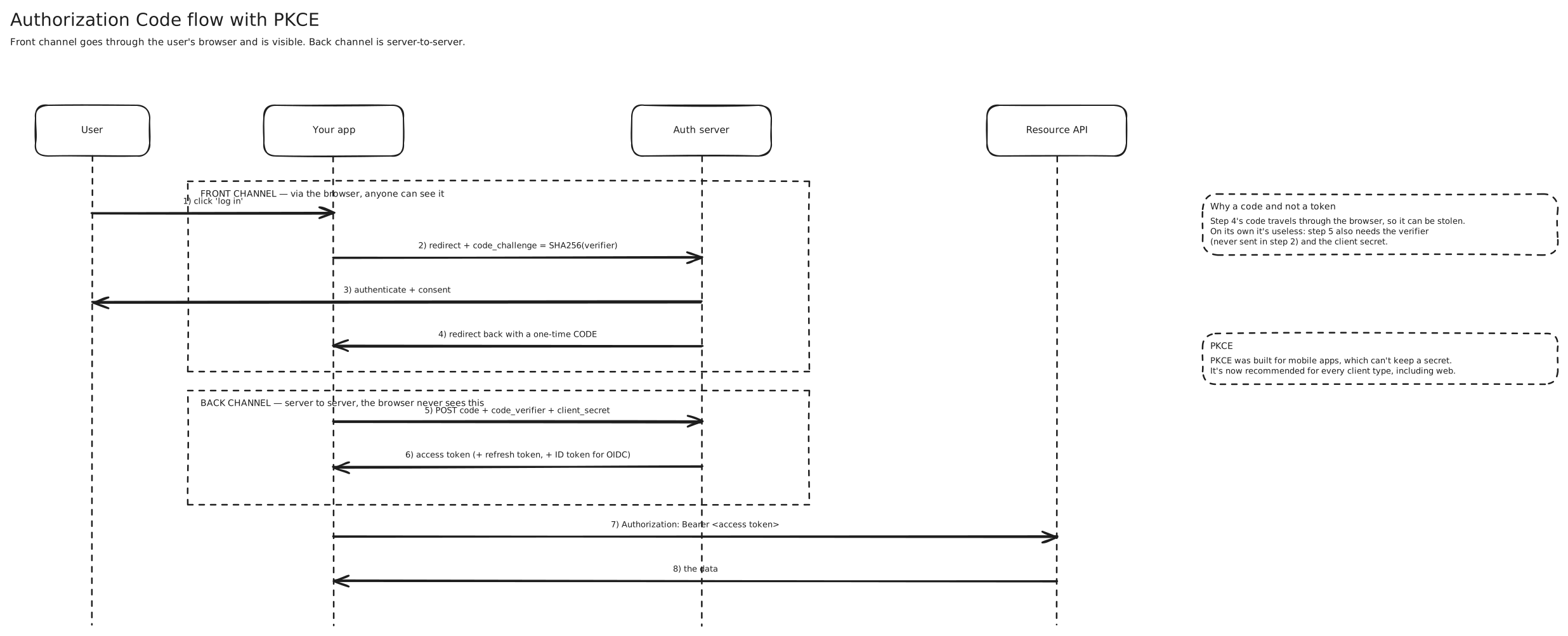
Walk it once in words. The print site never talks to the drive provider directly to start things off — it redirects the user’s browser there, carrying its own client_id, the redirect_uri it wants the answer sent back to, and the scope it’s asking for. The user sees drive.com in the address bar, logs in there, and consents there. The print site sees none of that.
Then the interesting bit: what comes back is not a token. It’s a short-lived, single-use authorization code. The browser carries it back to the print site’s callback URL.
Why the extra hop? Because step 4 travels through the browser, and the browser is a leaky place. URLs end up in history, in server access logs, in Referer headers, in the crash report your analytics SDK uploads. Anything that rides the front channel should be assumed to be seen.
So the code is worth nothing on its own. To turn it into a token, the print site makes a server-to-server call to the token endpoint, over TLS, presenting the code and its client secret. The drive provider checks that this code was issued to this client, that it hasn’t been used, and that it isn’t stale. Only then does it hand over the access token, on a connection the browser was never part of.
That’s the design: put the reusable secret on the channel that’s private and authenticated, put only a one-time claim ticket on the channel that’s public.
The access token then goes to the API in a header, per RFC 6750: Authorization: Bearer eyJ.... “Bearer” is doing real work in that name. The resource server does not check who is presenting the token. Whoever holds it, wields it — like cash.
Breaking the fix: the code gets intercepted
Now build a mobile app instead of a web backend, and the design springs a leak.
A native app can’t safely run a redirect to https://print.com/callback, because the answer needs to come back to the app on the device. So it registers a custom URL scheme — printapp://callback — and the OS routes the redirect there. It also can’t hold a client secret, because anyone can pull the binary apart and read it.
So the token request is: code, plus a client_id that’s public knowledge, and nothing else.
Here’s the attack. A malicious app on the same phone registers the same URL scheme. When the authorization server redirects to printapp://callback?code=xyz, the OS may hand that redirect to the attacker’s app instead. RFC 7636 puts it bluntly: “Once the attacker has gained access to the authorization code, it can use it to obtain the access token.” It has everything it needs. The client_id isn’t a secret and the code is now in its hands.
The fix is PKCE (Proof Key for Code Exchange), and it’s a lovely little piece of design. Before starting the flow, the client invents a fresh random string — the code_verifier, 43 to 128 characters — and keeps it in memory. It sends only the hash of it up front:
code_challenge = BASE64URL-ENCODE(SHA256(ASCII(code_verifier))) 1. authorize?...&code_challenge=<hash>&code_challenge_method=S256
(attacker can see this — it's the front channel — but it's a hash)
2. ...back comes ?code=xyz ← attacker may steal this
3. POST /token code=xyz & code_verifier=<the original random string>
(only the app that started the flow knows this)The authorization server stored the challenge alongside the code. At step 3 it hashes the verifier it just received and compares. If they don’t match, the spec requires an error: “an error response indicating invalid_grant … MUST be returned.”
The stolen code is now useless. The attacker has the code but never saw the verifier, and the hash it did see can’t be reversed.
Why PKCE now applies to your web app too
It’s tempting to say “we’re a confidential client with a real secret, PKCE is a mobile thing.” That was the 2015 view. RFC 9700, the current security best current practice, disagrees.
Public clients “MUST use PKCE”. And for confidential clients, “the use of PKCE is RECOMMENDED, as it provides strong protection against misuse and injection of authorization codes.”
The threat PKCE blocks for a confidential client isn’t code theft — it’s code injection. An attacker who obtains a code from their own legitimate session can try to splice it into your session, so that your browser lands on the callback carrying the attacker’s code, and your account gets linked to their data. Your client secret doesn’t help; your server happily redeems the code it was handed. PKCE stops it because the verifier is tied to the browser session that started the flow.
Two supporting rules from the same document. Authorization servers “MUST support PKCE”, and they “MUST mitigate PKCE downgrade attacks by ensuring that a token request containing a code_verifier parameter is accepted only if a code_challenge parameter was present” — otherwise an attacker just strips the challenge from the authorization request and PKCE evaporates. And redirect URIs must be matched exactly: “Authorization servers MUST utilize exact string matching except for port numbers in localhost redirection URIs of native apps.” Wildcard redirect matching is how codes get delivered to attacker-controlled subdomains.
The short version for an interview: authorization code + PKCE, for everything. The in-progress OAuth 2.1 work is essentially this consolidation — code flow with mandatory PKCE, with the dead grants deleted.
The grants, and which ones are dead
| Grant | Who it’s for | Status |
|---|---|---|
| Authorization code + PKCE | any app acting for a user — web, SPA, mobile, desktop | the default; use this |
| Client credentials | service-to-service, no user involved | alive and correct |
| Device code | TVs, CLIs, anything with no browser or keyboard | alive, for that niche |
Implicit (response_type=token) | browser apps, before CORS existed | deprecated |
| Resource owner password (ROPC) | “just let the app collect the password” | forbidden |
Implicit existed for a real reason. In 2012 a single-page app couldn’t make a cross-origin POST to a token endpoint — CORS wasn’t broadly deployed — so the authorization server skipped the code and returned the access token directly in the URL fragment. That put a live credential in the browser address bar, in history, and in anything reading the fragment, with no client authentication and no way to bind the token to the session that asked for it. RFC 9700: clients “SHOULD NOT use the implicit grant (response type token) or other response types issuing access tokens in the authorization response”. CORS solved the original problem years ago, so there’s no longer a reason to reach for it.
ROPC — the app collects the username and password itself and posts them to the token endpoint — is the password anti-pattern with a standards document stapled to it. RFC 9700 is as firm as these documents get: “The resource owner password credentials grant MUST NOT be used. This grant type insecurely exposes the credentials of the resource owner to the client.” It also can’t do MFA, can’t do a consent screen, and can’t do federated login, so it stops working the moment your identity story gets more interesting than a password column.
Client credentials is the odd one out and is worth knowing precisely, because it’s the one you’ll actually use inside a backend. There’s no user, no browser, no redirect, and no consent screen — a service authenticates as itself with its client ID and secret and gets a token scoped to what that service may do. Your billing service calling your ledger service is this. If you find yourself drawing a redirect in a machine-to-machine flow, something’s wrong.
Two tokens, and why
You get an access token. How long should it live?
Make it long — say a year — and you’ve recreated the password problem in a new shape. The token is a bearer credential, so a copy leaked from a log file or a proxy is a year of access, and revoking it means the resource server has to check a revocation list on every single request.
Make it short — ten minutes — and the blast radius of a leak is ten minutes. But now the user is bounced back through the login screen six times an hour, which is unusable.
The refresh token is the way out of that trade. RFC 6749 defines it as a credential used “to obtain a new access token when the current access token becomes invalid or expires, or to obtain additional access tokens with identical or narrower scope.”
The key structural property is where each one travels. The access token goes to the resource server, constantly, on every API call — lots of exposure, so keep it short-lived. The refresh token goes only to the authorization server, rarely, over the back channel — little exposure, so it can live for days or months. You’ve separated “the thing that gets used a lot” from “the thing that’s valuable”, which is the same instinct as the code/token split earlier.
Which raises the obvious question: what if the refresh token leaks? For a public client there’s no secret protecting it, so possession is everything. RFC 9700: “Refresh tokens for public clients MUST be sender-constrained or use refresh token rotation.”
Rotation means every refresh call returns a new refresh token and burns the old one. That doesn’t stop theft by itself — but it gives you reuse detection. If a token that was already exchanged shows up again, exactly one of two things happened: the attacker used it and then the real client did, or the reverse. Either way someone has a copy they shouldn’t, so the authorization server revokes the entire token family and forces a fresh login. You can’t prevent the theft, but you bound it to a single use and you find out.
Sender-constraining is the stronger option: bind the token cryptographically to a key the client holds, so a stolen copy is useless without it. That’s certificate-bound tokens over mutual TLS (RFC 8705 — see SSL TLS and mTLS) or DPoP (RFC 9449), where the client signs a proof per request. Banking and open-finance APIs mandate this. Most consumer APIs settle for rotation.
Scopes are not permissions
This one costs people offers.
A scope is a string the client asks for and the user consents to: photos.read, contacts.write. It bounds what the client may attempt. It says nothing about whether this particular user may touch this particular object.
Concretely: a token with photos.read does not mean “read any photo in the system.” It means “this client may use the photo-read API, on behalf of the user this token was minted for.” The resource server still has to answer the second question itself — is album 8821 owned by subject u_4471? If it skips that and trusts the scope, you have an authorization bug where anyone can enumerate other people’s albums with a perfectly valid token.
So the mental model is two gates. The scope gate is coarse, consent-facing, and lives in the token. The permission gate is fine-grained, per-object, and lives in your application’s own data. OAuth handles the first and has never claimed to handle the second. Roles and RBAC/ABAC live on your side of the line — often delivered as claims in the token, but enforced by you.
JWT tokens vs opaque tokens
The access token is “a string representing an authorization.” The spec doesn’t say what’s in it, and there are two real answers.
An opaque token is a random identifier. It means nothing on its own; the resource server calls the authorization server’s introspection endpoint (RFC 7662) to ask “is this live, who’s it for, what scopes?” A JWT carries the answers inside itself — issuer, subject, audience, expiry, scopes — signed by the authorization server, so the resource server verifies the signature locally using the issuer’s published public keys and asks nobody anything.
Start with the obvious appeal of JWTs. No network call on the hot path. Your resource servers scale out without hammering the authorization server, and they keep working during an authorization-server outage. For an API Gateway validating tens of thousands of requests a second, this is the difference between a design that works and one that doesn’t.
Now break it. A user’s account is compromised and you need to cut access now. With opaque tokens, you flip a row and the next introspection call says “inactive” — done in seconds. With a JWT, there is nobody to ask. Every resource server will happily accept that token until exp passes, because the signature is still valid and that’s the only check being made. A JWT is a statement about the past that you can’t retract.
The real-world answer isn’t to pick a side, it’s to shrink the window: keep JWT access tokens short — minutes, not hours — and let the refresh token carry the long life. Revocation then happens at the refresh step, which is a call to the authorization server, and your exposure is bounded by the access token lifetime. You accept that a compromised token works for a few more minutes in exchange for never doing a lookup on the read path.
If you need faster than that, you can push a denylist of revoked token IDs (jti) to the edge — but notice that you’ve now reintroduced a shared lookup on every request, which is the cost you adopted JWTs to avoid. That’s the honest trade, and saying it out loud is what separates a good answer from a memorised one.
OIDC: the part OAuth won’t tell you
Everything so far has been about access. Nowhere in it did the drive provider ever tell the print site who the user is.
That sounds like a technicality until you watch people build “Log in with Drive” on top of plain OAuth. The pattern is: run the code flow, get an access token, call /me with it, read back {"id": "u_4471", "email": "..."}, and create a session for that user.
Try to state what you actually proved there. You proved you hold a token that the API accepts. Tokens are bearer credentials, so that only proves you have one — not that the user just authenticated to you, not when, and crucially not that the token was ever meant for you. A malicious app that got a token for its own site can hand it to your login endpoint; you’ll call /me, get the victim’s profile, and log the attacker in as them. This is the token substitution problem, and it exists because you’re using a credential as if it were evidence.
Be precise about the distinction, because it’s the single most common OAuth error in interviews. The authorization server does authenticate the user — that’s the login screen. OAuth 2.0 simply has no mechanism for reporting that authentication back to the client in a verifiable way. It’s an authorization framework. The information you need is genuinely not in the protocol.
OIDC adds it. It describes itself as “a simple identity layer on top of the OAuth 2.0 protocol”, and the layer is thin on purpose: same authorization code flow, same endpoints, one extra scope, one extra token.
The ID token
Add openid to your scope — the spec requires it, and “if the openid scope value is not present, the behavior is entirely unspecified” — and the token endpoint returns an id_token alongside the access token.
The ID token is “a security token that contains Claims about the Authentication of an End-User by an Authorization Server.” It’s a signed JWT, and the claims that are always required are the ones that close the holes above:
iss— who issued this. You check it matches the issuer you trust.sub— the stable, unique-within-the-issuer identifier for the user. This, not the email address, is your foreign key. Emails change hands.aud— “MUST contain the OAuth 2.0 client_id of the Relying Party”. This is the fix for token substitution. A token minted for someone else’s client fails this check.exp— “the current time MUST be before the time represented by the exp Claim”.iat— when it was issued.
Plus nonce, which you generate per login and send in the authorization request. If it’s in the token, “Clients MUST verify that the nonce Claim Value is equal to the value of the nonce parameter sent” — that binds this identity assertion to this login attempt, blocking replay of an old one. And auth_time, required when you asked for max_age, which lets you say “re-authenticate if they logged in more than an hour ago” for a sensitive operation.
The two tokens now have cleanly separate jobs, and keeping them separate matters:
The ID token is for you, the client. You verify it and throw it away, having learned who logged in. Never send it to an API as a credential. The access token is for the resource server. You treat it as an opaque string and forward it. Never try to parse it for identity — even when it happens to be a readable JWT, its contents aren’t a contract you own.
UserInfo and discovery
The ID token holds the minimum. For profile data there’s the UserInfo endpoint: “a Protected Resource that, when presented with an Access Token by the Client, returns authorized information about the End-User.” You call it with the access token, and what comes back depends on which of the standard scopes the user consented to — profile (name, picture, locale), email, address, phone.
Why two places for claims? Size and freshness. Putting a fat profile in every ID token bloats it, and the profile goes stale the moment it’s signed. Small identity assertion in the token, richer data fetched on demand.
Discovery is what makes this genuinely interoperable rather than a per-provider integration. Providers “MUST make a JSON document available at the path formed by concatenating the string /.well-known/openid-configuration to the Issuer”:
GET https://accounts.example.com/.well-known/openid-configuration

{
  "issuer": "https://accounts.example.com",
  "authorization_endpoint": ".../authorize",
  "token_endpoint":         ".../token",
  "userinfo_endpoint":      ".../userinfo",
  "jwks_uri":               ".../jwks.json",
  "scopes_supported":        ["openid", "profile", "email"],
  "response_types_supported":["code", "id_token", "code id_token"]
}
Your library reads this at startup, pulls the signing keys from jwks_uri, and is configured. It also makes key rotation a non-event: the provider publishes a new key with a new kid, your client refetches the JWK set when it sees an unknown kid, and nothing needs redeploying. That’s why “how do you handle signing key rotation” has a boring answer — as long as you didn’t hardcode the key.
Where this shows up
- Any “Sign in with Google / Apple / GitHub” button. These are OIDC on top of OAuth; the button is the authorization request and the account you create is keyed on
subfrom the ID token. - An API Gateway validating JWTs at the edge so that downstream services receive an already-authenticated request with the user identity in a header, and never implement token verification themselves.
- Service-to-service auth inside a backend, via client credentials — each service has its own client ID and a token scoped to what it may call.
- Third-party API integrations — a payroll app reading your accounting ledger, a CI system pushing to your repos. Scoped, revocable from a settings page, no password shared.
In an interview
Bring it up when your design has users with private data and any surface that isn’t your own first-party UI — a public API, third-party integrations, or a mobile client.
Say “authorization code with PKCE” and know why the code exists at all: the front channel is visible, so it carries a single-use ticket and the token comes back over the authenticated back channel. If you say “implicit flow” or describe the app collecting the password, you’ve dated yourself by a decade.
The most common mistake is claiming OAuth authenticates the user. It authorizes access. The user’s identity arrives only if you asked for the openid scope and validated the ID token’s signature, iss, aud, exp and nonce.
Expect a push on revocation, and don’t dodge it: a JWT can’t be un-issued, so keep access tokens to minutes and put the long life in a rotating refresh token, with reuse detection to catch theft. Expect a second push on scopes — the resource server must still check that this user owns this object.
Related
Single Sign-On · SSL TLS and mTLS · API Gateway · REST GraphQL and gRPC · Rate Limiting
Sources
- RFC 6749 — The OAuth 2.0 Authorization Framework
- RFC 6750 — OAuth 2.0 Bearer Token Usage
- RFC 7636 — Proof Key for Code Exchange (PKCE)
- RFC 9700 — Best Current Practice for OAuth 2.0 Security
- OpenID Connect Core 1.0
- OpenID Connect Discovery 1.0
- RFC 8705 — OAuth 2.0 Mutual-TLS Client Authentication and Certificate-Bound Access Tokens
- RFC 9449 — OAuth 2.0 Demonstrating Proof of Possession (DPoP)