Stage 10 · Security and specialised
Single Sign-On
Your company runs twelve internal tools. Email, the wiki, the CI system, expenses, the HR portal, four dashboards.
Without SSO, that’s twelve passwords per employee. Which in practice means one password reused twelve times, or twelve sticky notes. It also means twelve places to remember to revoke access when someone leaves — and if you miss one, an ex-employee still has a way in.
SSO makes it one login.
The shape
There are two roles.
The identity provider (IdP) is the one place that actually authenticates people. It holds credentials, enforces MFA, and knows who works here. Okta, Entra ID, Google Workspace, Keycloak.
The service providers are the twelve applications. None of them stores a password. Each one trusts the IdP to say who you are.
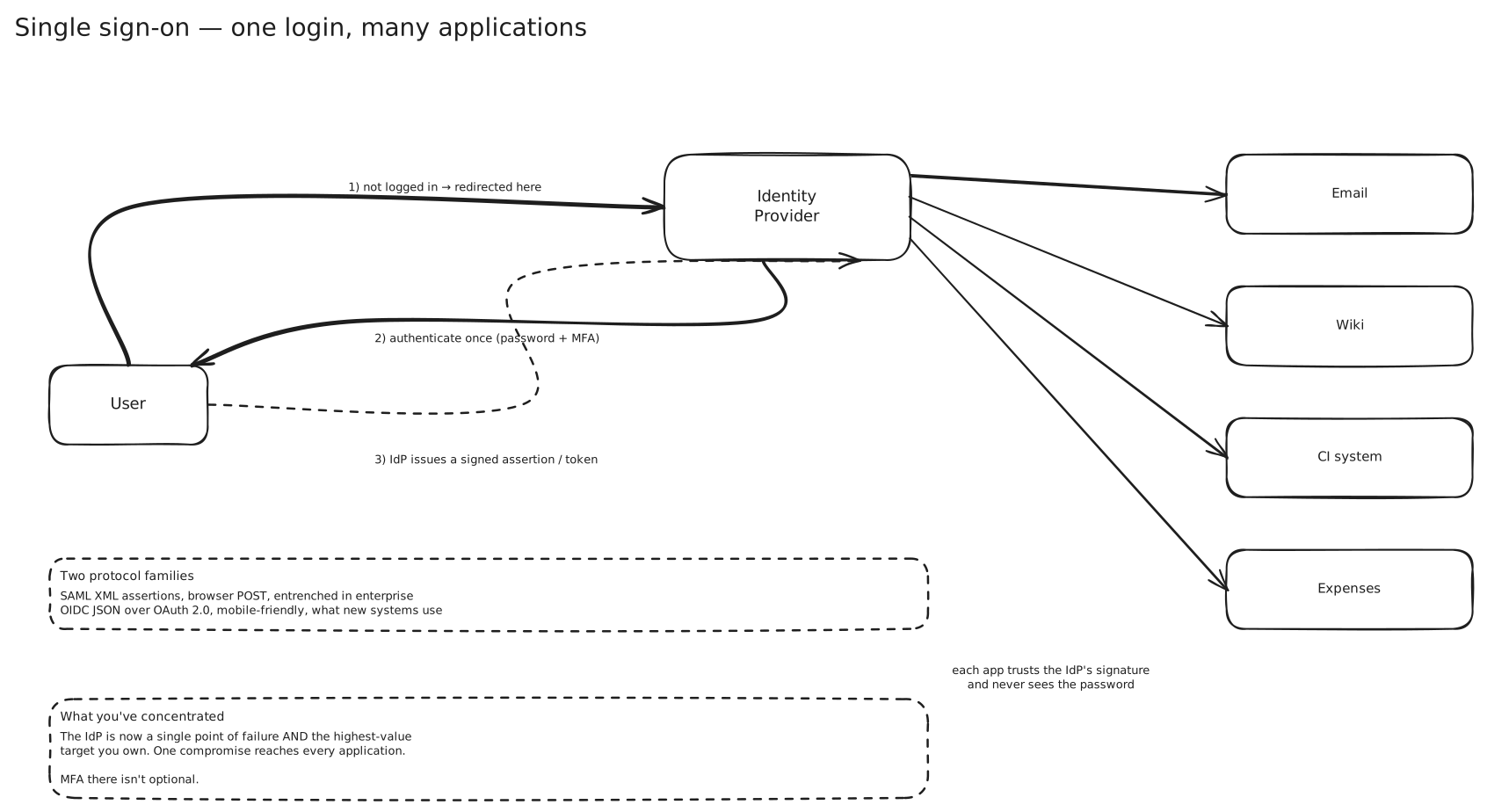
The flow, once:
You hit the wiki. It doesn’t know you, so it redirects you to the IdP. The IdP either recognises your existing session or makes you log in properly — password plus a second factor. It then sends you back to the wiki with a signed assertion saying “this is Rohit, I verified it, here’s my signature.”
The wiki checks the signature against the IdP’s public key, trusts it, and logs you in.
Now the important part. When you open the CI system five minutes later, it also redirects you to the IdP — and the IdP already has a session with you. No prompt. Straight back with a new assertion. That invisible second round trip is the whole feature.
Notice what the wiki never sees: your password. It only ever sees an assertion it can verify. That’s the security win underneath the convenience one.
SAML and OIDC
Two protocol families do this, and which you meet depends mostly on how old the system is.
SAML 2.0 is XML-based, dates from 2005, and is deeply entrenched in enterprise software. The assertion is a signed XML document, typically delivered by making the browser POST a form to the service provider. It’s verbose and the signature validation is genuinely fiddly — XML signature wrapping attacks are a real class of vulnerability. It’s also what your enterprise customers will ask for, so if you’re selling B2B software you’ll be implementing it regardless of preference.
OIDC is the modern one — JSON, REST, built as a thin identity layer on top of OAuth 2.0. The assertion is a JWT. It works properly on mobile and in single-page apps, which SAML never really did. It’s what you should use for anything new. → OAuth 2.0 and OIDC
The distinction that trips people up: OAuth alone is not SSO. OAuth 2.0 is an authorization framework — it grants an application access to a resource. It says nothing about who the user is. OIDC is the layer that adds identity, via the ID token. “Sign in with Google” is OIDC, not bare OAuth, even though people call it OAuth constantly.
Sessions, and why logout is broken
Here’s where SSO gets genuinely awkward, and it’s worth knowing because it’s the honest answer to an interview follow-up.
You now have two layers of session. One with the IdP, which is what makes the second and subsequent logins invisible. And one with each application, created after it accepted the assertion.
Logging in propagates outward from the IdP. Logging out doesn’t.
If you log out of the wiki, you’ve ended the wiki’s session. Your IdP session is still alive, so clicking the wiki link again logs you straight back in with no prompt — which looks broken to users and is broken from a security standpoint on a shared machine.
Single logout is meant to fix this: the IdP notifies every application that has an active session for you and each one terminates it. In practice it mostly doesn’t work. It depends on every application implementing the logout endpoint correctly, on browser front-channel calls via hidden iframes that third-party cookie restrictions increasingly block, and on the IdP knowing every session it created. One application that ignores the callback leaves a live session behind, and nothing tells you.
The pragmatic answer most organisations settle on: short application session lifetimes so the window is small, plus genuine session revocation at the IdP for the cases that matter.
What you’ve concentrated
SSO doesn’t reduce risk so much as relocate it.
The IdP is a single point of failure. If it’s down, nobody can log into anything. Not one tool — all twelve. That makes IdP availability a tier-zero concern, and it’s why organisations care about their IdP’s SLA far more than most of their own services. → Availability
The IdP is the highest-value target you own. One compromised IdP account reaches every application. This is why phishing-resistant MFA there isn’t a nice-to-have, and why you’d rather have hardware keys or passkeys than SMS codes.
What you get in exchange is real, though. One place to enforce password policy and MFA. One place to see every login. And critically, one place to revoke — disabling someone in the IdP removes access to all twelve tools at once, rather than hoping someone remembers the CI system.
For most organisations that trade is clearly worth it. Just be able to say what it is.
Three terms people mix up
SSO — one login session across multiple applications within one trust domain.
Federation — extending trust across organisations. A contractor logs in with their own company’s IdP and gets access to yours. Same protocols, different trust boundary.
Social login — “Sign in with Google” on a consumer site. Technically SSO with an external IdP, but the trust relationship is completely different: you’re outsourcing identity to a company with no contract with you, and if they lock the account, your user loses access to your product too.
Where this shows up
- Every enterprise of any size. Okta, Entra ID and Google Workspace are the common IdPs.
- B2B SaaS, where “do you support SAML SSO?” appears on every enterprise procurement checklist, usually gated behind the expensive tier.
- Consumer apps offering social login to remove signup friction.
- Kubernetes and cloud consoles, which federate to a corporate IdP rather than holding their own users.
In an interview
If the system has internal users or enterprise customers, SSO is the expected answer for authentication, and OIDC is the expected protocol for anything new.
The distinction to get right is authentication versus authorization — SSO establishes who you are once; each application still decides what you can do. Those are separate, and conflating them is a common error.
The best thing to volunteer is the logout problem. Almost nobody mentions it, and “single logout is specified and mostly doesn’t work in practice, so we keep application sessions short” is the kind of answer that comes from having actually shipped this.
Related
OAuth 2.0 and OIDC · SSL TLS and mTLS · API Gateway · Availability · Service Discovery