Stage 08 · Services and infrastructure
VMs and Containers
Two problems drove all of this. The first is “it works on my machine” — code that runs locally and dies in production because the environment differs. The second is waste: a physical server running one application at 8% CPU while you pay for all of it.
Virtual machines solved both, expensively. Containers solved both again, much more cheaply, by giving up something.
Virtual machines
A hypervisor sits between hardware and operating systems and lets several OSes share one machine, each believing it has the hardware to itself.
Type 1 runs directly on the metal (ESXi, Xen, KVM) and is what clouds use. Type 2 runs as an application on your desktop OS (VirtualBox, VMware Workstation).
The isolation is genuinely strong. Each guest has its own kernel, its own memory, its own virtual devices. A guest can panic its kernel and the others don’t notice. Modern CPUs have hardware support for this, so the performance overhead is small.
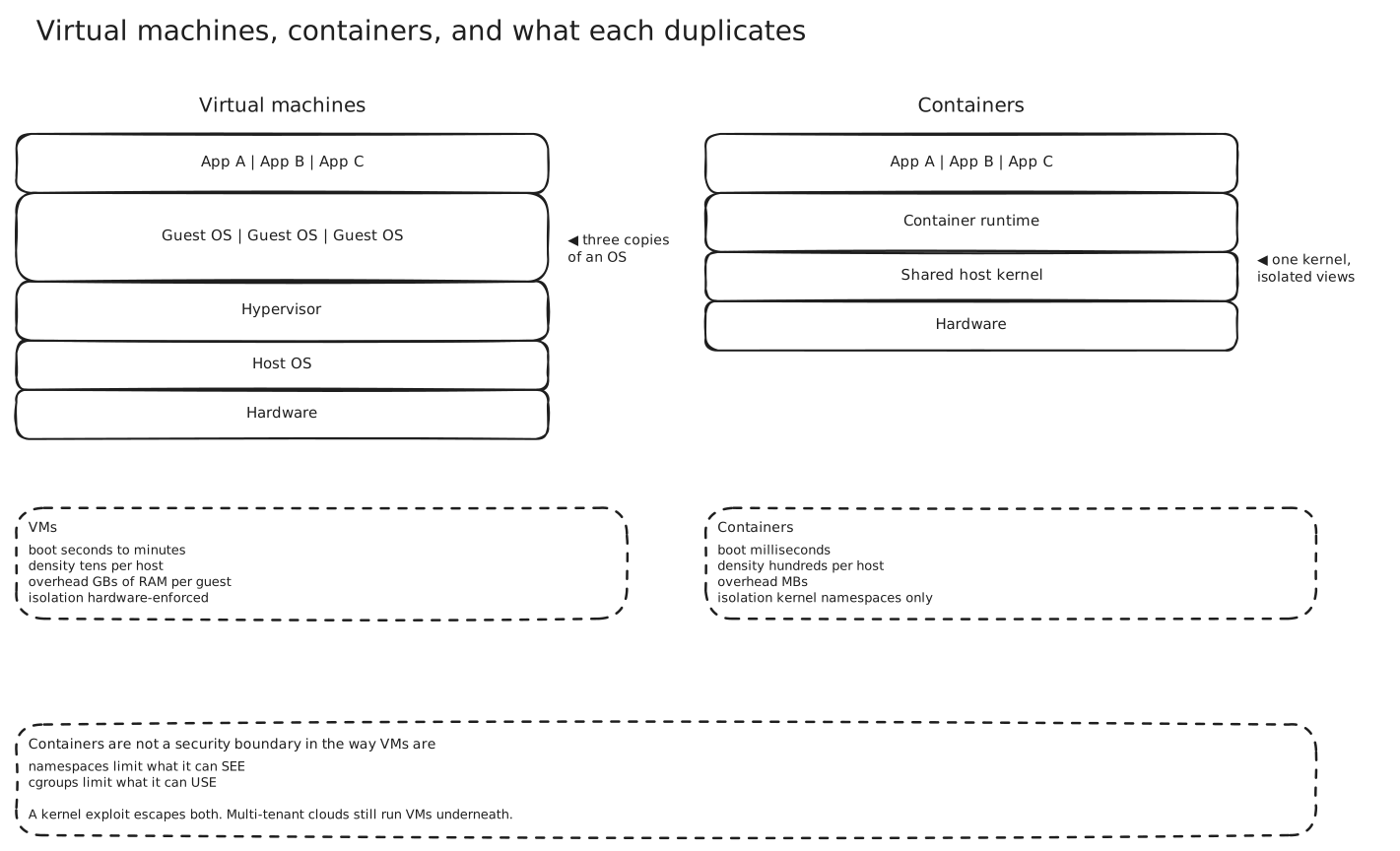
The cost is visible in that diagram: three applications, three complete operating systems. Each guest OS is gigabytes of RAM and disk doing exactly the same job as the one next to it. Booting one takes tens of seconds to minutes, which rules out scaling in response to a traffic spike that’s already happening.
Containers
Look at what’s actually being duplicated. Three copies of a kernel, three copies of a filesystem, three sets of system daemons — to run three processes.
A container skips all of it. It’s just a process on the host kernel, with a restricted view of the world.
Two Linux features do the work:
Namespaces limit what a process can see. A PID namespace means the container sees only its own processes and thinks it’s PID 1. A mount namespace gives it its own filesystem root. Network, user and hostname namespaces do the same for those.
Cgroups limit what a process can use — CPU shares, memory ceiling, I/O bandwidth. This is what stops one container starving the others.
There’s no guest OS because there’s no second kernel. Which is why a container starts in milliseconds, weighs megabytes, and you can pack hundreds onto a host that would hold tens of VMs.
The image is the other half of the story. A container image is a stack of read-only filesystem layers, each a diff on the one below. Layers are content-addressed and shared, so ten images built on the same base share that base on disk and over the network. And because the image contains the dependencies, the “works on my machine” problem is genuinely solved — the machine comes with the code.
What you gave up
Why you then need an orchestrator
Containers make one machine’s problem easy and immediately create a fleet problem. Which host does this container run on? What happens when it dies? How do other services find it when it moves? How do you roll out a new version without downtime?
Kubernetes answers all of those, and its central idea is worth understanding even if you never operate it: you declare the desired state — “five replicas of this image, reachable at this name” — and a control loop continuously reconciles reality toward it. You don’t script the steps; you state the goal and the system closes the gap.
From that one idea you get scheduling onto hosts with capacity, self-healing when a container or node dies, a stable name in front of moving instances (Service Discovery), rolling deploys with automatic rollback, and horizontal autoscaling (Scalability).
The cost is that Kubernetes is genuinely complex, and running it yourself is a full-time job for a team. For three services, it’s the wrong answer — a managed platform or plain containers on a VM will serve you better.
Serverless, and the thing that defines it
The next rung: don’t manage instances at all. Write a function, and the platform runs it on demand, scaling from zero.
The tradeoff that defines serverless is the cold start. If no instance is warm, the platform must provision one before your code runs. That’s tens to hundreds of milliseconds, sometimes seconds for a heavy runtime — and it lands on an unlucky user’s request, at the worst possible moment during a traffic spike. Provisioned concurrency fixes it by keeping instances warm, which is also how you reinvent paying for idle capacity.
Serverless fits spiky, event-driven, short work. It fits long-running connections badly — which is a direct problem for the WebSocket designs in Real-Time Server Push.
Where this shows up
- Every CI pipeline, which needs a clean reproducible environment per run.
- Microservice deployments, where per-service dependency isolation is the point. → Monoliths and Microservices
- Local development, where
docker compose upreplaces a page of setup instructions. - Multi-tenant platforms, where the VM-versus-container security question is a live architectural decision rather than trivia.
In an interview
This is infrastructure context rather than a design topic — you’ll say “containers on Kubernetes” and move on. Don’t spend time on it unprompted.
The two points worth having ready: containers share a kernel, so they’re an isolation mechanism rather than a security boundary; and Kubernetes is a reconciliation loop over declared state, not a deployment script.
If someone proposes serverless, cold starts are the first thing to raise — along with whether the workload holds long-lived connections, because that’s where it fails hardest.
Related
Scalability · Service Discovery · Clustering · Monoliths and Microservices · Availability · Real-Time Server Push