Stage 05 · How requests arrive
DNS
You have a running service and an IP address that reaches it. Two problems remain: nobody can remember the number, and the number is going to change.
DNS solves both by putting a stable name in front of a moving target. It’s also, quietly, the first load balancer in almost every request path — which is where it gets interesting, and where it disappoints people.
Start with the version that doesn’t scale
The first internet solved naming with a text file.
Every machine kept a local file mapping names to addresses. You wanted to reach shop, you looked in the file, you found 203.0.113.17. One organisation maintained the master copy, and everyone downloaded it periodically.
For a few hundred machines this is completely fine. It’s fast — a local file read, no network round trip. It’s simple. You can read it.
Now grow it.
Every change has to reach every machine. You move your store to a new server; until every host on the internet re-downloads the file, some of them send traffic to the old address.
One team becomes the bottleneck for everyone’s names. You can’t add a name for your new service without going through them.
The file gets enormous and the download traffic to distribute it scales with (number of names) × (number of machines).
Your local /etc/hosts file is the fossil of this design, and it still works — which is why “check whether someone put an entry in hosts” remains a real debugging step.
So what’s the fix? Look at the failure list again: it’s really one problem three times. Everything is centralised — the data, the authority, and the distribution.
The fix: delegate the name, one label at a time
DNS decentralises all three by splitting names into labels and letting each level hand off responsibility for everything below it.
Read a name right to left, because that’s the direction authority flows:
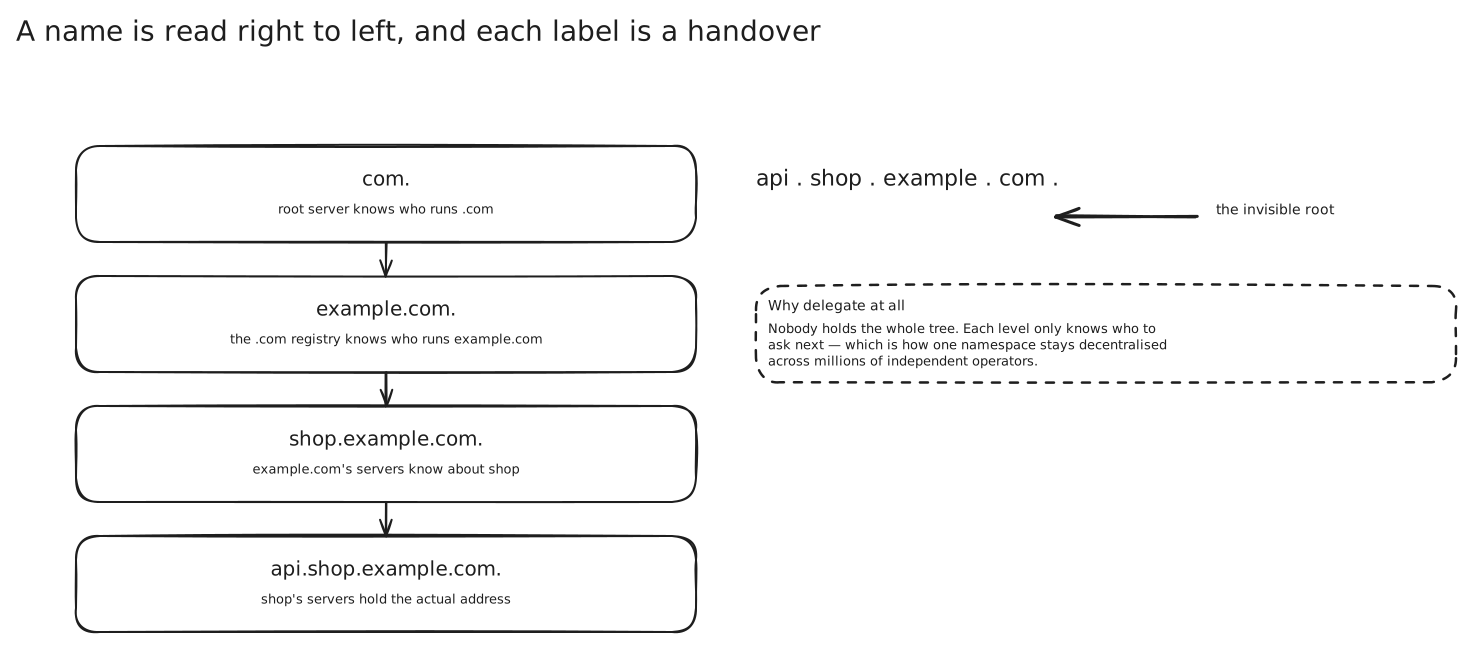
The root doesn’t know anything about your store. It knows who runs .com. The .com registry doesn’t know anything about api.shop.example.com either — it knows which nameservers are authoritative for example.com. And those nameservers are yours, so once you own the domain you can create, move and delete names beneath it without asking anyone.
That’s the whole architecture. Nobody has to know everything; each level only has to know who to ask next. Authority is distributed, data is distributed, and changes to your names never touch anyone else’s system.
Walking one lookup end to end
Your browser needs api.shop.example.com. Here’s what actually happens, assuming nothing is cached anywhere.
The browser asks the operating system, which asks a recursive resolver — run by your ISP, or a public one like 8.8.8.8 or 1.1.1.1, or your own VPC resolver. This is the one query your machine makes. Everything after this, the resolver does on your behalf.
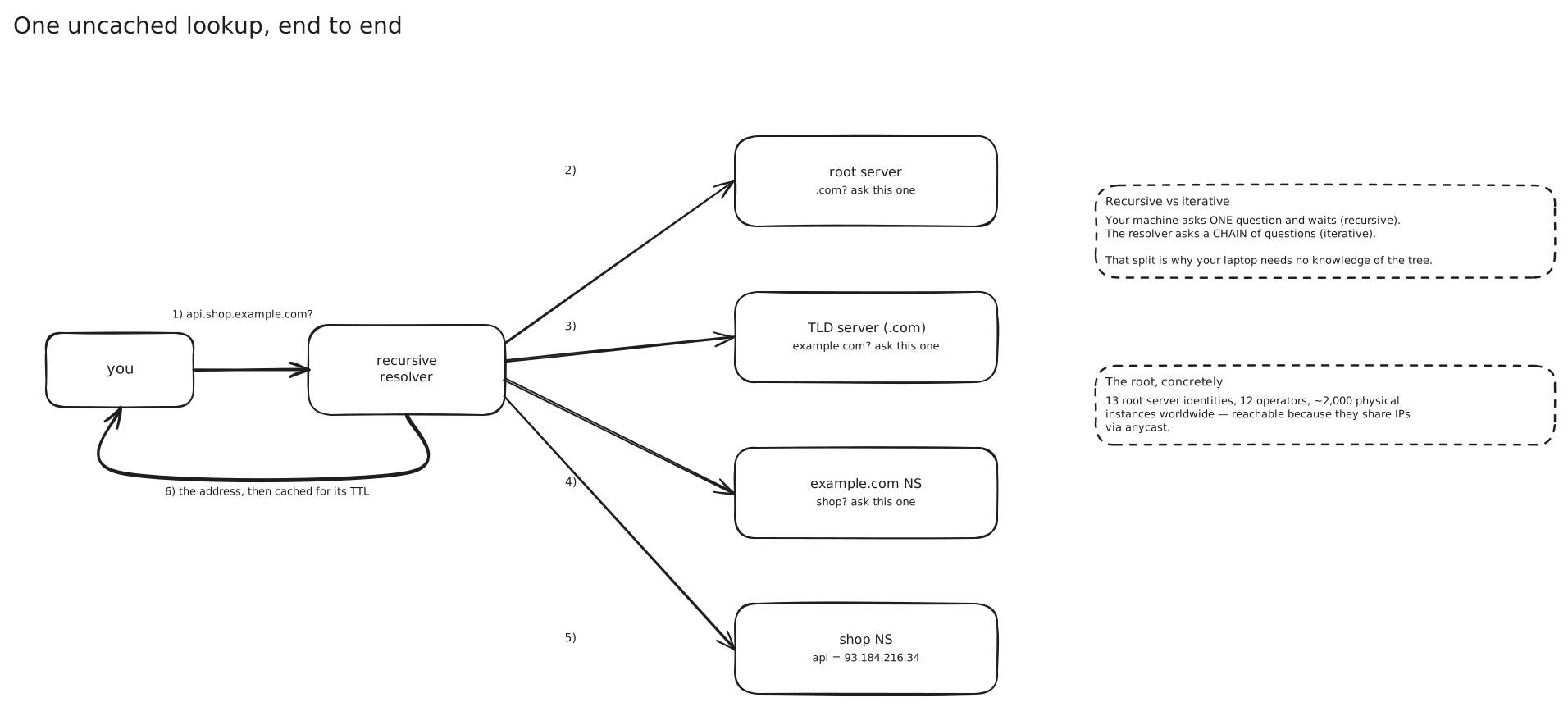
Three referrals, then an answer. The resolver never gets a partial answer or a redirect chain — each server hands back the best it has, which is usually “here’s who to ask next.”
Two distinctions are worth having straight, because interviewers occasionally poke at them. The query you sent your resolver was a recursive query: you asked for a final answer and it was the resolver’s job to produce one. The queries the resolver sent upward were iterative: each server answers with what it knows and refers onward, and the resolver keeps driving. The recursion lives in one place, which is exactly why caching works so well — one resolver serving a million users caches on behalf of all of them.
The root, and why 13 servers can serve the planet
The root layer sounds like an obvious single point of failure. There are only 13 root server identities, lettered A through M, operated by 12 independent organisations.
But those letters aren’t machines. Each one is an address announced from many physical sites at once, using anycast: multiple locations advertise the same IP prefix into internet routing, and the routing system naturally delivers your packet to whichever one is closest in network terms. The root server system currently runs on the order of two thousand instances worldwide behind those 13 addresses.
Anycast is worth understanding on its own, because it’s the other coarse traffic-steering tool alongside DNS and it shows up again in CDN design. You don’t change the answer; you change what the address means depending on where you are. A site that goes down simply stops announcing the prefix, and routing converges onto the remaining sites — without any cache anywhere needing to expire. That last property is exactly what DNS-based failover can’t give you, as we’re about to see.
The records you’ll actually name
A name doesn’t resolve to “an address” so much as to a set of typed records. The ones that come up in design conversations:
A maps a name to an IPv4 address. AAAA does the same for IPv6. → IP Addressing
CNAME points one name at another name, and resolution continues from there. This is how you point www.shop.example.com at a load balancer’s or CDN’s own hostname and let them change their addresses freely underneath you.
NS names the authoritative servers for a zone. These are the records that make delegation work — the .com servers hold the NS records for example.com.
MX directs mail. TXT holds arbitrary text, which in practice means domain ownership proofs and mail policy. SRV publishes a host and port for a named service, which makes it usable for Service Discovery.
There’s one constraint worth knowing because it bites people in real designs. A CNAME can’t coexist with other records at the same name, which means you can’t put one at the zone apex — the bare example.com — because the apex must carry NS and SOA records. So you can CNAME www.example.com to your load balancer, but not example.com itself. Every managed DNS provider papers over this with a proprietary record type (ALIAS, ANAME, Route 53’s alias records) that behaves like a CNAME but is resolved server-side and returns an address.
TTL, and why “propagation” is the wrong word
Every record carries a TTL — how long a resolver may cache the answer before asking again. That number is doing enormous work. It’s the reason the root servers aren’t melting: the vast majority of lookups are answered from a resolver’s cache without a single upstream query.
Now change something and watch the cost.
Your store’s A record points at 203.0.113.17 with a TTL of 3600. You cut over to a new server and update the record to 203.0.113.99.
Your authoritative server changed instantly. There’s no queue, no replication delay worth mentioning. If someone queries it right now, they get the new address.
But every resolver that answered a query in the last hour is still serving .17, and will keep doing so until its cached copy expires. Different resolvers cached at different moments, so they expire at different moments, spread across the next full hour.
This is what people call “DNS propagation”, and the name is misleading in a way that leads to bad decisions. Nothing is propagating. No push is in flight. Old answers are simply being served from caches until they expire. You can’t speed it up, you can’t flush someone else’s resolver, and there is no progress bar.
Worse, the TTL is a hint, not a rule. Browsers keep their own DNS cache with their own timing. Operating systems cache. Some runtimes have historically cached resolved addresses for the life of the process regardless of TTL. Connection pools hold sockets to an address that was resolved once at startup and never re-checked — so even a resolver doing everything right doesn’t help if nothing re-resolves.
The way to actually make a cutover fast is to plan it:
- Lower the TTL to something small — 60 seconds — and wait at least one full old TTL so every cached copy of the long TTL has expired.
- Make the change. Now the worst case is 60 seconds of stale answers.
- Once it’s settled, raise the TTL back up so you’re not paying for a lookup on every connection.
DNS as a load balancer
Here’s the part that matters for design. A name can resolve to several addresses, and the resolver hands them out — so DNS distributes traffic whether you meant it to or not.
The basic version is round-robin: list four A records, and resolvers rotate the order they return them. Clients typically try the first one. Traffic spreads across four servers and you didn’t deploy anything.
Managed DNS providers build much more on top of this. The Route 53 policy list is a good survey of what’s possible, because every provider offers roughly the same set:
- Weighted — send 90% here, 10% there. This is how canary deploys and gradual migrations are done at the DNS layer.
- Latency-based — return the region that measures fastest for the resolver asking.
- Geolocation and geoproximity — answer based on where the user is, or where your resources are, with the ability to shift traffic between locations. This is what people mean by GeoDNS.
- Failover — an active-passive pair, where the secondary is returned only when a health check says the primary is down.
- Multivalue answer — return up to eight healthy records chosen at random, which is round-robin with the dead ones filtered out.
GeoDNS has one wrinkle worth knowing. DNS servers see the resolver’s address, not the user’s. Someone in Berlin using a resolver in Virginia looks, to your nameserver, like they’re in Virginia. The patch is an extension called EDNS Client Subnet, where the resolver passes along a truncated version of the client’s network so the authoritative server can answer for the right place. Public resolvers generally support it; it’s an extension, not a guarantee.
Why it’s a blunt instrument
DNS-based balancing is appealing because it costs nothing and sits before every request. Then you try to rely on it for failure handling, and you find the edges.
You cannot remove a dead server faster than caches expire. A server dies. Your health check notices — say within 30 seconds. Your provider stops returning that record. But every resolver that cached the old answer keeps handing it out for the rest of its TTL, and every client that cached it keeps using it, and every connection pool already holding a socket to that address keeps trying. Your actual recovery time is health-check interval plus TTL plus however long clients ignore the TTL. That’s minutes, and some of it isn’t yours to control.
The protocol has no idea what health is. DNS returns records. That’s it. Health checking is something your provider bolts on beside it, probing from a handful of locations on a fixed interval. It sees “does this address respond”, not “is this backend slow, is its error rate climbing, is it about to fall over.”
It balances resolutions, not requests. This is the subtle one. One resolver serving a million users caches one answer and gives it to all of them for the whole TTL. You didn’t spread a million requests across four servers — you spread a few thousand resolutions, and each one carried an unpredictable amount of traffic behind it. The result is lumpy, and it’s lumpy in a way you can’t see or correct.
It’s blind to load. DNS can’t observe connection counts, queue depth or response times. It hands out an answer computed from a static policy. Nothing in the loop can say “that one’s busy, use the other.”
Clients disagree about what to do with multiple answers. Some try the first and give up. Some try each in turn. Some cache one and never look again. You get no say.
So what’s it actually good for? Coarse steering, not fine control. DNS is excellent at answering which region, which CDN, which cluster — a decision that changes on the scale of minutes and doesn’t need to know anything about individual backends. Within that region, a real Load Balancing tier does the work it’s good at: per-request decisions, active health checks, connection draining, and removing a backend in seconds because it owns the connection rather than a cached answer about one.
That two-tier answer — DNS or anycast for the coarse geographic decision, load balancers for everything inside a region — is the shape interviewers are usually listening for.
Where this shows up
- Every CDN. You
CNAMEyour hostname to the CDN’s, and their DNS answers with an edge near you — or they use anycast and let routing do it. → CDN - Blue/green and canary deploys via weighted records, shifting a small percentage of traffic before committing.
- Multi-region active-active, where latency or geolocation routing sends each user to their nearest region and a health check pulls a whole region out of rotation if it fails.
- Internal service discovery. Kubernetes gives every service a cluster-internal DNS name, and consumers resolve it rather than tracking pod addresses. → Service Discovery
- Outages caused by DNS rather than by the thing DNS points at — expired domains, a bad record push, a resolver dependency in the startup path of a service.
In an interview
Bring it up when the design goes multi-region, or when you’re explaining how a client reaches the system at all. One or two sentences is usually right: a name resolves to a regional entry point, and a load balancer takes it from there.
The push you should expect is on failover time. If you’ve said “DNS will fail over to the other region”, be ready to give a number and show you know where it comes from: health-check interval, plus TTL, plus client caching that ignores the TTL. Then say what you’d do about it — anycast, or accept it and make the failover graceful.
The most common mistake is treating DNS as a real load balancer. It distributes resolutions, has no load signal, and can’t remove a dead backend promptly. Use it for coarse steering and put something that knows what a request is behind it.
If TTL comes up, the fast credible answer is the staged cutover: lower it in advance, wait out the old one, change, raise it back.
Seen in
- Web Crawler · DNS, Robots and Traps — a crawler visits thousands of hosts it has never seen, so almost every lookup is a cache miss and DNS becomes a bottleneck of its own
Related
IP Addressing · TCP and UDP · OSI Model · Load Balancing · CDN · Proxies · Service Discovery