Stage 05 · How requests arrive
OSI Model
Most people meet the OSI model as seven words to memorise in order, and then never use it again.
That’s a waste, because the model is answering a real engineering question — how do you build a network out of parts that can be replaced independently? — and the answer is the reason you can say “L4 load balancer” and have everyone know what you mean.
Build a network with no layers and see what happens
Imagine you’re writing the first version of a messaging app, and there is no TCP, no IP, nothing. Just two machines and a wire between them.
You write one program. It drives the modem directly, turning bytes into tones. It notices when a byte comes back garbled and asks for it again. It knows the other machine is at the far end of this specific wire. It formats the message and shows it on screen.
It works. Ship it.
Now three things happen to you in the same month.
A customer wants to run it over a satellite link instead of copper. Different signalling, different error characteristics. You open your program and discover the modem code and the retransmission code and the message formatting are all tangled together. You end up rewriting most of the app.
A second team wants to write a file transfer app. They need the same retransmission logic you wrote. There’s no way to share it — it’s welded to your message format. So they write their own, slightly differently, with their own bugs.
A customer wants to reach a machine that isn’t at the end of the wire — it’s two hops away, through a machine in between. Your program has no concept of “somewhere else”. There’s nowhere to put that idea.
Every one of these is the same problem: you have no seams. Everything depends on everything.
The fix: define contracts and stack them
So you cut the program into levels, and you write down what each level promises the level above it.
The bottom level promises: “give me bits, I’ll get them onto the wire somehow.” It doesn’t know or care what the bits mean.
The next level up promises: “give me a chunk of data and the address of a machine on this same link, I’ll deliver it.” It uses the bottom level. It doesn’t know about satellites versus copper, because that’s the bottom level’s problem.
The next promises: “give me data and the address of a machine anywhere, I’ll get it there — maybe.” It uses the level below to hop from link to link.
The next promises: “give me a stream of bytes, I’ll deliver them reliably and in order.” It uses the maybe-delivery below and adds numbering and retransmission on top.
And the top level is your app, which finally just gets to write messages.
Now the satellite customer only touches the bottom level. The file transfer team reuses everything below the top. And “somewhere else” has an obvious home. Each layer only has to know two things: the contract it offers upward, and the contract it consumes downward.
That’s what the OSI model is. It’s not a list of protocols. It’s a proposal for where the seams should go.
Following one request down the stack
The mechanism is easier to see on a real request than in a list. Your browser asks a store for a product page. Watch what each layer adds.
At the top, your browser produces text:
GET /products/1138 HTTP/1.1
Host: shop.example.com
That’s application data. It’s meaningful to the store’s web server and to nothing else in the path.
The transport layer wraps it. It prepends a header with a source port, a destination port (443), a sequence number and an acknowledgement number, and hands down a segment. Ports are the interesting part — they’re how one machine runs a web server and a database at once and keeps their traffic separate.
The network layer wraps that. It prepends a header with your source IP address and the store’s destination IP address, and hands down a packet. This header is what every router in between reads and nothing else. → IP Addressing
The link layer wraps that. It prepends the hardware address of the next hop — your home router — and hands down a frame.
The physical layer turns the frame into voltage, light or radio.
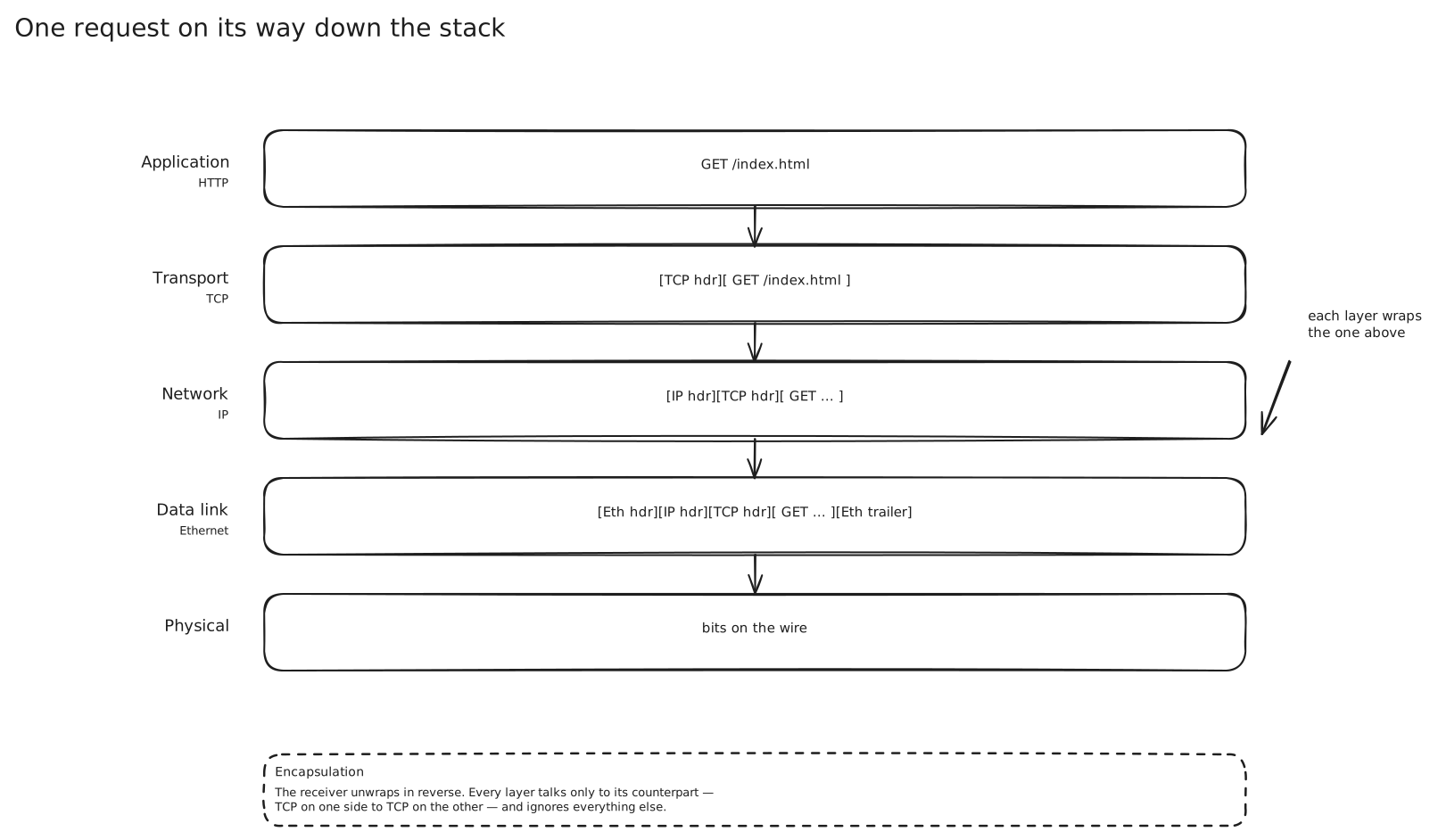
On the way back up at the store’s server, each layer strips its own header and hands the rest upward. The web server sees exactly the text the browser wrote, with no idea it crossed an ocean.
Two details in that diagram matter more than the rest.
The link header is rewritten at every hop; the IP header is not. That’s the difference between “next machine on this wire” and “final destination”.
Each header is pure overhead. A 30-byte message can easily carry more than its own size in headers, which is the entire argument for keeping a connection open rather than re-establishing one per message. → Real-Time Server Push
So where are the seven?
That walkthrough used five boxes. OSI proposed seven, and the extra two are worth understanding precisely because of how little you’ll use them.
Going up from the wire:
1 — Physical. Bits become signals. Cables, radio, optics, voltage levels, connector shapes. The only layer where the answer to “how does a 1 differ from a 0” lives.
2 — Data link. Delivers a frame between two devices on the same link, and handles the local addressing that makes that possible. Ethernet and Wi-Fi are here, as are switches. Its scope is one hop, never more.
3 — Network. Delivers a packet between two devices on different networks, by choosing a next hop and repeating. This is IP, and it’s where the idea of a route exists at all. Its promise is deliberately weak: best effort, no guarantee of arrival, order or uniqueness.
4 — Transport. Turns that weak promise into something an application can build on, and multiplexes it between the many programs on one machine using ports. TCP adds reliability and ordering; UDP adds almost nothing on purpose. → TCP and UDP
5 — Session. Establishing, maintaining and resuming a conversation across multiple exchanges — including checkpoints you can restart from after an interruption.
6 — Presentation. Making the bytes mean the same thing on both ends: character encoding, serialisation format, compression, encryption.
7 — Application. The protocol your software actually speaks. HTTP, SMTP, gRPC, WebSockets, DNS.
Layers 1 through 4 map cleanly onto real, separable pieces of software and hardware, which is why they’ve lasted. Layers 5 and 6 describe real work — nobody disputes that encryption and session resumption have to happen somewhere — but no widely deployed stack implements them as independent layers with their own contracts. They got absorbed upward.
The honest version: the practical stack has four layers
Now the part textbooks skip. OSI is not what the internet runs on.
The internet runs on the TCP/IP model, which has four layers: link, internet, transport, application. It was designed separately and it won. OSI survived as vocabulary, mostly because the numbers turned out to be useful shorthand.
The two layers with no real home are 5 (session) and 6 (presentation). In practice, “presentation” work — encryption, compression, serialisation — happens either inside TLS or inside the application protocol. “Session” is whatever the application protocol says it is. Nobody ships a session layer.
So if the model is only half real, why does every networking conversation still use the numbers?
Because three of them name the places where you can put a box in the path.
L3, L4, L7: the only three numbers that matter
Here’s the thing to actually understand. A device sitting in the middle of a connection can only make decisions using information it can see, and how much it can see depends on how far up the stack it’s willing to look. That’s what the layer number is really telling you.
A device operating at L3 sees IP addresses. Source, destination, protocol. It has no idea whether the traffic is HTTP or a database connection. Routers work here. So do network ACLs, security groups and IP allowlists: “permit 10.0.4.0/22 to 10.0.9.0/24” is an L3 statement.
A device operating at L4 sees the 5-tuple — source IP, source port, destination IP, destination port, protocol — and nothing more. It knows you’re talking to port 443 but not what you’re asking for. It can’t read a URL because the URL is encrypted inside a TLS session it never opened.
A device operating at L7 speaks the application protocol. It parses HTTP. It sees the path, the method, the headers, the cookies. To do that it must terminate the TLS connection, because you cannot parse what you cannot decrypt.
| L3 | L4 | L7 | |
|---|---|---|---|
| Sees | IP addresses | the 5-tuple | paths, headers, cookies |
| Decides using | destination prefix | port and address | anything in the request |
| Unit of work | a packet | a connection | a request |
| Typical boxes | routers, security groups | NLB, IPVS, TCP proxies | ALB, NGINX, Envoy, API gateways |
Read the “unit of work” row twice. That’s the difference that generates every other difference.
Why “connection” versus “request” is the whole story
An L4 load balancer picks a backend once, when the connection is opened, and then shovels bytes between the two sockets without understanding them. It’s fast and cheap because it’s barely doing anything. It also can’t change its mind: if that connection carries a thousand HTTP requests over ten minutes, all thousand go to the backend that was chosen at second zero.
An L7 load balancer terminates the client’s connection, reads a complete request, and then opens or reuses its own connection to a backend. It picks per request. It can send /api/checkout to one pool and /static/* to another, retry a failed idempotent request against a different backend, rewrite headers, and hold a pool of warm backend connections so clients never pay for a backend handshake.
That capability isn’t free. Terminating means decrypting, parsing and re-encrypting, which costs CPU and adds latency. And terminating means the backend no longer sees the client’s address, so the proxy has to put it back in a header for anyone downstream to use.
The practical consequence for design: long-lived connections favour L4, request-level intelligence needs L7. A WebSocket fleet is well served by an L4 balancer — the connection is opened once and lives for hours, so per-request routing buys you nothing and the proxy would just be a middleman holding state. An HTTP API with several backend services behind one hostname needs L7, because routing by path is the entire point.
The two layer choices are unpacked properly in Load Balancing, and the general shape of a box in the middle — forward or reverse, what it can see, what it must terminate — is Proxies.
What layering costs
Layering is not free, and the cost shows up in a specific place: a layer can’t see what the layer above it is doing.
TCP hands the application one ordered stream of bytes. It has no idea that stream contains fifty independent HTTP requests. So when one packet is lost, TCP stalls everything until it’s retransmitted, including the forty-nine requests that didn’t need that packet at all. The layer below is doing exactly what its contract says, and the result is terrible.
That’s head-of-line blocking, and it’s the clearest example of a layering seam put in the wrong place. Fixing it meant redrawing the seam — teaching the transport layer about independent streams, which is what QUIC does. The full story is in TCP and UDP.
The other recurring cost is encapsulation overhead: every layer’s header rides on every packet, forever.
Where this shows up
- Cloud load balancer product names are layer names. AWS calls them Network Load Balancer (L4) and Application Load Balancer (L7); GCP splits its offerings the same way. Choosing between them is choosing a layer.
- Firewalls and WAFs. A security group filters at L3/L4 on addresses and ports. A web application firewall inspects request bodies at L7, which is why it has to sit inside the TLS boundary.
- Service meshes put an L7 proxy next to every service so retries, timeouts and routing rules can be expressed per request rather than per connection.
- Debugging. “Is it DNS, is it the network, is it the connection, or is it the application?” is a walk up the stack, and it’s the fastest way to bisect an outage.
In an interview
You’ll almost never be asked to recite seven layers. You’ll constantly be asked to place a box and justify it.
The moment to bring this up is when you draw anything between a client and a server: name the layer it operates at and what it can therefore see. That single sentence covers TLS termination, routing capability and client-IP visibility at once.
Expect a push on cost. “Why not L7 everywhere, it can do more?” — because it terminates and re-encrypts every connection, which costs CPU and latency, and because for a long-lived socket you’re paying for per-request intelligence you never use.
The common mistake is treating the layer as trivia rather than a constraint. If you claim an L4 balancer routes by URL path, you’ve said it can read encrypted application data it never decrypted.
Related
IP Addressing · TCP and UDP · DNS · Load Balancing · Proxies · SSL TLS and mTLS · API Gateway