Stage 05 · How requests arrive
Load Balancing
One machine can only do so much work, and eventually it stops. Load balancing is how you turn “buy more servers” into “serve more users” without every client having to learn your topology.
The interesting part isn’t the distribution. It’s everything the load balancer has to know in order to distribute well — which servers are alive, which requests are expensive, and which requests have to go somewhere specific.
One server, and then too many people
You’re running an online bookstore. One application server, one database, one domain name. store.example.com resolves to 203.0.113.10 and that’s the whole architecture.
Suppose that box comfortably handles 500 requests per second. A launch goes well and you’re now seeing 4,000. Response times climb, then the request queue backs up, then connections start timing out and the box is effectively down.
The first instinct is to buy a bigger box. Double the cores, double the RAM. That works, exactly once, and then you’re back here with a more expensive machine. It also doesn’t help at all with the other problem: you still have one machine, so one bad kernel panic is still a full outage.
So: more boxes. Eight of them, each running the same code, all talking to the same database. The capacity exists. The question is how a browser in Denver finds one.
The obvious answer, and why it isn’t enough
The simplest thing that could possibly work is DNS. Put eight A records on store.example.com, one per server, and let the resolver hand out a different one each time.
This genuinely works, and it’s genuinely used. It’s also the reason “DNS round robin” has a bad reputation, because of what happens next.
Server 5 dies at 2am. DNS doesn’t know that. It keeps handing out 203.0.113.15 to one caller in eight, and every one of those users gets a connection refused. You update the DNS record to remove it — and now you wait, because resolvers, operating systems and browsers all cached the old answer for the TTL, and some of them will hold it longer than the TTL says. Your outage lasts as long as the longest cache in the chain, and you don’t control any of them.
The deeper issue is that DNS answers a question once, at the start, and then has no further say. Nothing is watching the servers. Nothing can react. We need something that sits in the request path, sees every request, and knows which servers are currently healthy.
Putting a box in front
So we put a load balancer in front. Clients only ever learn one address — the load balancer’s. It holds the list of backend servers, checks whether they’re alive, and picks one per connection or per request.
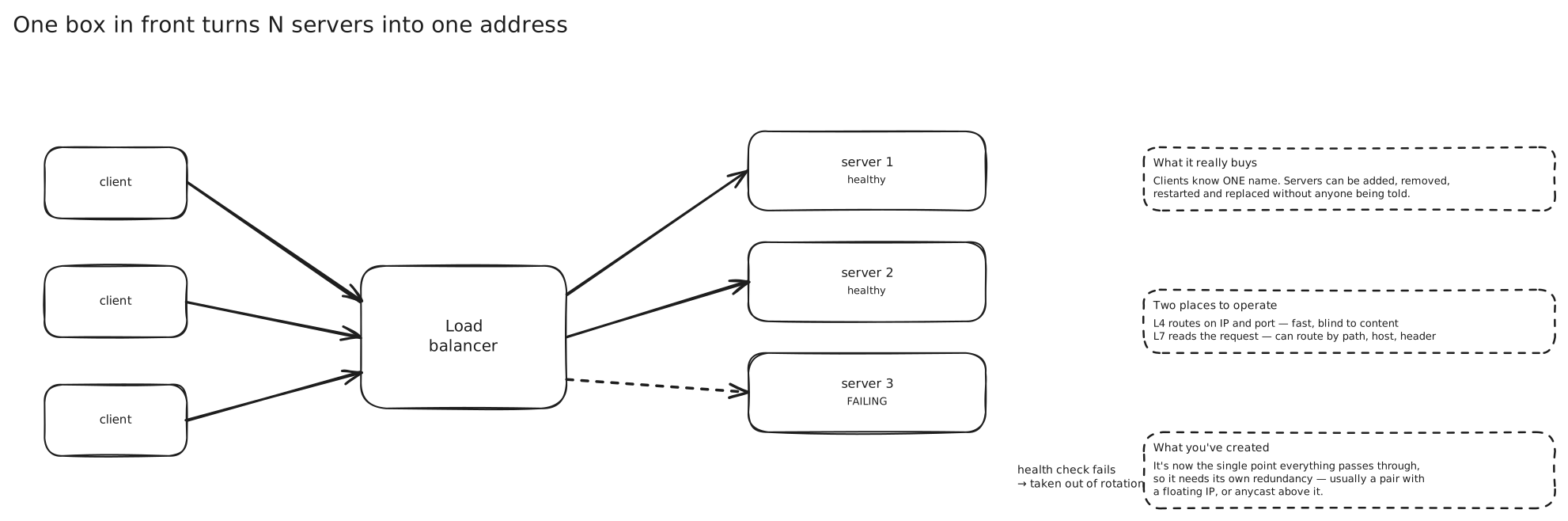
Adding a ninth server is now a config change in one place. Removing a sick server is a config change in one place. Nobody’s browser has to be told anything.
That’s the whole idea. Everything below is the consequence of it.
What layer is it looking at?
The load balancer has to decide something about each connection. How much it can decide depends on how much of the traffic it’s willing to look at.
A Layer 4 load balancer works at the transport layer. It sees source IP, destination IP, ports and the TCP or UDP header — and that’s it. It picks a backend for the connection, then shuffles packets between the two ends for the life of that connection without ever looking inside them.
Because it doesn’t parse anything, it’s fast and cheap, and it works for any protocol. It also means every byte of a given TCP connection lands on the same backend, which matters enormously for long-lived connections. If you’re running WebSockets, the connection is the session, and L4 gets you that for free.
What it can’t do is route on anything meaningful. It has no idea whether a request is GET /health or POST /checkout, because to an L4 balancer both are an indistinguishable stream of bytes — and if the connection is TLS-encrypted, they’re indistinguishable even in principle.
A Layer 7 load balancer terminates the connection and parses the application protocol. It reads the HTTP request line and headers, and now it can do things: send /api/* to the API service and /images/* to the image service, route on a Host header, on a cookie, on an Accept-Language.
Because it makes a decision per request rather than per connection, it can also do the things that only make sense per request — retry a failed request on a different backend, inject a trace header, multiplex a thousand client connections onto a small pool of keep-alive connections to the backend.
The cost is CPU (parsing and re-serialising HTTP isn’t free), latency (a bit, per hop), and the fact that it must be able to read the traffic, which means TLS terminates here. We’ll come back to that.
On AWS, the Network Load Balancer is the L4 one and the Application Load Balancer is the L7 one, and that naming is a reasonable mnemonic for the distinction generally.
How does it pick a server?
Now the actual choice. Start with the simplest rule and let it break.
Round robin. Keep a counter, hand out server 1, 2, 3, 4, 1, 2, 3, 4. Every server gets the same number of requests.
That’s the flaw. Requests aren’t the same size. Your bookstore has a /search endpoint that does a full-text query and takes 800ms, and a /cart/count endpoint that reads one integer and takes 2ms. Round robin cheerfully gives server 3 three searches in a row while server 4 gets three cart lookups. Server 3’s thread pool fills, its queue grows, and its p99 goes through the roof — while server 4 sits mostly idle. You have eight servers’ worth of hardware and maybe five servers’ worth of usable throughput.
Least connections fixes exactly that. Instead of counting requests handed out, count requests currently in flight, and send the next one to whoever has the fewest. A server stuck on three slow searches stops receiving work until it catches up. Request cost stops mattering because you’re measuring occupancy, not arrivals.
Then you scale the load balancer tier itself and least-connections develops a problem of its own. With six load balancer instances, each one only knows about its own in-flight requests. All six independently notice that the freshly-added server 9 has zero connections, and all six simultaneously pile onto it. That’s herding, and it hurts worst at exactly the moment you’re adding capacity under load.
Envoy’s answer to this is nice and worth knowing: instead of scanning all hosts for the minimum, pick two at random and send to the less loaded of the two. That’s the power of two choices, and Envoy’s weighted-least-request balancer uses it by default with a sample size of two. It’s O(1) instead of O(N), and because every balancer samples independently, they don’t all converge on the same victim.
Least response time goes a step further and weights by observed latency, not just connection count. It’s better when your servers aren’t identical. It also has a genuinely nasty failure mode: a server that has started returning 500s in 1ms looks like the fastest server in the fleet, so the algorithm sends it more and more traffic. A latency-based balancer without error-rate awareness will happily funnel your entire fleet’s traffic into the one broken machine.
Weighted variants exist for both. The honest use isn’t heterogeneous hardware (though that’s the textbook answer) — it’s deployments. Give the new version weight 1 and the old version weight 99, watch the error rate, then shift. That’s a canary, and it’s the same mechanism.
Hash-based routing is the odd one out, because it isn’t trying to balance at all. It hashes something about the request — client IP, a URL path, a user ID header — and always sends the same key to the same server. You want this when the backend holds something per-key that’s expensive to rebuild: a warm local cache, an in-memory index shard, an open connection.
Plain hash(key) % N has the problem it always has. Add a ninth server and N changes, so nearly every key moves and every warm cache is cold at once. → Consistent Hashing
Envoy ships both real answers. Ring hash is classic ketama consistent hashing — hosts placed on a ring, key walks clockwise. Maglev uses a fixed 65,537-entry lookup table instead; Envoy’s docs put it at roughly 10× faster to build and 5× faster to look up than ring hash, at the cost of disrupting more keys when the host set changes.
With that walked through, the summary is fair:
| Algorithm | Balances on | Reach for it when |
|---|---|---|
| Round robin | request count | backends and requests are uniform; it’s the default for a reason |
| Least connections | in-flight requests | request cost varies a lot (search, uploads, reports) |
| Least response time | observed latency | backends differ in capacity — but pair it with error-rate ejection |
| Weighted (any of the above) | operator-set weights | canary rollouts, mixed instance types, draining a zone |
| Hash / consistent hash | a key in the request | the backend holds per-key state you don’t want to rebuild |
Health checks, and how to get them wrong
The load balancer’s most valuable job isn’t picking well. It’s not picking the dead one.
Active health checks are the load balancer reaching out on a schedule: GET /health every few seconds, expect a 200. Two details make this work in practice. You eject a server only after N consecutive failures, and you return it only after M consecutive successes. Without that hysteresis, one dropped packet ejects a healthy server and one lucky probe returns a dying one, and the fleet flaps.
Passive health checks — Envoy calls this outlier detection — watch real production traffic instead. Five consecutive 5xxs from a host, or a gateway failure, and the host gets ejected for a while, then tentatively returned. This catches things a synthetic probe misses, because it’s testing the actual code path users are hitting.
You want both. Active checks find a server that’s gone; passive checks find a server that’s answering and answering wrongly.
Now the trap. Someone writes a thorough health check: it pings the database, checks the cache, verifies the message broker. Thorough is good, right?
The database has a 20-second blip. Every one of your eight servers fails its health check at the same instant, because they all depend on the same database. The load balancer, doing precisely what you told it to, ejects the entire fleet and starts returning 503 to everyone. The database recovers 20 seconds later. Your outage was three minutes, because now everything has to pass N consecutive checks again, and the reconnect stampede makes that slow.
Two fixes, and you want both. Separate liveness from readiness — “is this process functioning” is a different question from “can this process serve traffic right now”, and a shared-dependency failure should not answer the first one. And configure a minimum healthy threshold: Envoy’s panic mode is the canonical version, where if fewer than a configured percentage of hosts are healthy, it gives up on health checking and load balances across all of them. The reasoning is worth internalising — if 90% of your fleet looks dead, the most likely explanation is that your health check is wrong, and sending traffic to possibly-sick servers beats sending it nowhere.
The last piece is connection draining. When you deploy, you don’t want to yank a server holding 4,000 in-flight requests. You mark it draining, the balancer stops sending it new work, and you wait out a deregistration delay before the process exits. Skipping this is why deploys show up as a spike in your error graphs.
Sticky sessions, and why they’re a correctness trap
Here’s where a lot of designs quietly go wrong.
Your bookstore has a login. A user authenticates, and the server stores their session — user id, cart contents, CSRF token — in a map in process memory. Fast, simple, no extra infrastructure.
With one server that was fine. With an L7 load balancer making a fresh decision per request, the user logs in on server 3, clicks “My Account”, lands on server 6, and server 6 has never heard of them. They’re bounced to the login page. Then it happens again.
The available fix is session affinity: pin each user to one server. Two flavours. A cookie-based one, where the balancer sets its own cookie naming the chosen target — AWS’s ALB uses AWSALB (and AWSALBCORS when CORS is in play), defaulting to a one-day duration with a maximum of seven. Or a source-IP hash, which needs no cookie and works at L4.
It works. And it’s a trap, because you have just made your application’s correctness depend on a specific process staying alive.
Deploys break it. Every rolling restart drops every session on that server. Users are logged out because you shipped a CSS change.
Autoscaling stops working. You add three servers during a traffic spike. Existing sessions are pinned and don’t move. The new servers take only genuinely-new users, so relief arrives slowly, precisely when you needed it fast. AWS’s own documentation lists this as a downside: sticky targets can’t take advantage of newly added capacity.
Failure stops being graceful. Without stickiness, a dead server means some requests get retried elsewhere. With it, a dead server means those users lost their carts.
Source-IP hashing has its own specific disaster. A corporate office or a mobile carrier NAT puts thousands of distinct users behind one source address, and they all hash to the same server. You’ve built a hotspot on purpose. Meanwhile a phone that switches from wifi to cellular changes its IP mid-session and loses its stickiness anyway, so you got the downside without the upside.
There are legitimate uses. A multi-part upload in progress on one machine’s disk has to continue there. A WebSocket connection is inherently pinned, because it’s one TCP connection. A server holding an expensive warm local cache benefits from consistent routing. The test is simple: if losing the affinity means a slower request, it’s an optimisation. If it means a wrong answer, you have state in the wrong place.
TLS termination
Everything is HTTPS now, which means every new connection pays for a TLS handshake — asymmetric crypto, a couple of round trips, real CPU.
If each of your eight app servers terminates its own TLS, then each of them needs the certificate and the private key, and each of them needs to have the renewal handled. Eight copies of a private key is eight chances to leak one.
Terminate at the load balancer instead. One place holds the cert. One place handles renewal — on AWS that’s ACM doing it automatically. The handshake CPU is spent on a box whose entire job is connection handling, and your application servers get to spend their cores on application work.
There’s a second reason, and it’s the one people forget: an L7 load balancer cannot route on content it can’t read. Path-based routing, header routing, cookie-based stickiness, WAF inspection — none of that is possible on an encrypted stream. TLS termination isn’t just an optimisation, it’s a precondition for most of what an L7 balancer does.
The obvious objection is that traffic between the balancer and the servers is now plaintext. Whether that’s acceptable is a threat-model and compliance question, not a technical one, and there are three answers.
Leave it plaintext inside a private network, which is common and fine for a lot of systems. Re-encrypt, where the balancer terminates the client’s TLS and opens a fresh TLS connection to the backend, often with an internal or self-signed cert — you get content routing and encryption on the wire, at the cost of two handshakes. Or go to mutual TLS, where the backend also verifies the balancer’s identity. → SSL TLS and mTLS
The fourth option is TLS passthrough at L4: the balancer never decrypts, just forwards bytes. You’d do this when the application genuinely needs end-to-end encryption or needs to inspect client certificates itself. You give up every L7 feature to get it.
One consequence to remember either way: once a proxy is in the path, your application’s view of “the client’s IP address” is the proxy’s IP address. The real one arrives in X-Forwarded-For (or via the PROXY protocol at L4), and anything that depends on client IP — geolocation, per-IP rate limits, abuse blocking — is silently wrong until you configure the app to trust and read that header. → Rate Limiting
Who load balances the load balancer?
We removed a single point of failure and, if we’re not careful, installed a new one. Everything now goes through one box.
Active-passive is the classic answer. Two load balancers, one serving, one idle, sharing a virtual IP that the active one holds. They heartbeat at each other; when the passive stops hearing from the active, it claims the VIP and traffic follows. Failover happens in seconds. In-flight connections usually die, because the standby doesn’t have the active’s connection state unless you’ve gone to the trouble of syncing it. And the standby has to be exercised on purpose, regularly, or you’ll discover during the incident that it was misconfigured six months ago.
Active-active runs several balancers all serving traffic, which is better use of the hardware — but now something above them has to spread traffic across them, and we’re back to the original question one level up.
There are two real answers at that level. DNS with multiple records hands clients different balancer addresses, with all the TTL problems we started with — acceptable here because balancers fail much less often than app servers, and it’s how you’d steer between regions anyway. Or anycast: announce one IP address via BGP from many locations at once, and let internet routing deliver each client to a nearby announcement. Failing over means withdrawing a route, which propagates in seconds and needs no client to expire anything. → DNS · CDN
The full picture is layered, and each layer fails over on a different timescale:
  client
    │
    │   DNS / anycast              spreads across sites & regions
    │                              failover: seconds to minutes
    ▼
  edge L4 balancer                 spreads across the L7 tier
    │                              failover: milliseconds, per-connection
    ▼
  L7 balancer / reverse proxy      path routing, TLS, retries, WAF
    │                              failover: per-request
    ▼
  service instances
In a cloud design you mostly don’t build this. A managed ALB or NLB is already a horizontally-scaled fleet behind a DNS name, and its own high availability is the provider’s problem. That’s a perfectly good thing to say in an interview — followed immediately by noting that a managed balancer is still confined to one region, so cross-region failover is still yours to design. → Disaster Recovery
Client-side load balancing
Everything so far assumes a box in the middle. There’s another shape, and it’s what most large internal architectures actually use.
Your bookstore has grown into a dozen services, and the checkout service calls the inventory service several times per order. Routing every one of those internal calls through a shared load balancer costs an extra network hop each way, plus a tier you have to scale and operate, plus a thing that can fail between two services that were both perfectly healthy.
So let the caller choose. The inventory instances register themselves in a registry; the checkout service subscribes to that registry, holds the current list of healthy inventory endpoints in memory, and picks one itself. No middle box, no extra hop. → Service Discovery
This is not exotic. gRPC does it natively. Redis Cluster does it for data: the client learns the slot map and computes which of the 16,384 hash slots a key belongs to, then connects directly to the node that owns it. Uber’s Ringpop does it with a consistent hash ring plus gossip membership, so any node can route without a coordinator.
What it costs you is that the load balancing logic now lives in every client, in every language you use. Changing a retry policy or an algorithm means redeploying every caller. Clients can hold a stale view of membership and keep calling a node that’s gone. And a buggy client can hammer one instance with nobody in a position to stop it.
The middle path is to keep client-side placement while getting the logic out of the application: run a proxy as a sidecar next to every process. The app makes a plain call to localhost; the sidecar does discovery, balancing, retries, outlier detection and mTLS, and you upgrade it independently of the app. → Proxies
Where this shows up
- AWS ALB vs NLB — the same split as L7 vs L4, including the practical consequence that NLB is what you use for WebSocket-heavy or non-HTTP traffic.
- nginx and HAProxy — the software reverse proxies most on-prem load balancing is actually built from; HAProxy is the reference for L4/L7 health checking and queueing behaviour.
- Envoy — where the modern algorithm names come from (P2C weighted least request, ring hash, Maglev, outlier detection, panic thresholds), used both at the edge and as a service-mesh sidecar.
- Redis Cluster and gRPC — client-side balancing in the wild: the client computes the destination instead of asking a proxy.
In an interview
Draw the load balancer, then say what layer it’s at and why — that single sentence separates people who’ve deployed one from people who’ve read about one.
Expect to be pushed on state. “What happens when a user’s next request hits a different server?” is the most common follow-up, and the answer they want is stateless servers plus an external session store, not sticky sessions.
Expect to be pushed on health checks. Be ready for “what if the health check passes but the server is broken”, and have passive/outlier detection ready as the answer.
The most common mistake is drawing one load balancer and never mentioning that it’s now a single point of failure. You don’t need to design VRRP on the whiteboard — just name it and say active-passive with a floating IP, or anycast, or “managed, so the provider handles it.”
The second most common is reaching for sticky sessions to solve a state problem. It’s the fix that makes deploys and autoscaling worse.
Seen in
- 02 - Ride Request Flow — a passenger reconnects after a tunnel, the load balancer hands them a different server, and that server creates a duplicate ride. The textbook case for why per-server state is a correctness bug.
- Uber · High Level Design — both apps open WebSockets to “whichever gateway the load balancer picks”, and the design then has to record
id → serverIpbecause that choice is now sticky by construction.
Related
Proxies · CDN · Clustering · Service Discovery · Consistent Hashing · OSI Model · TCP and UDP · DNS · API Gateway · Availability · Scalability · SSL TLS and mTLS · Rate Limiting