Stage 07 · Async and messaging
Kafka
An order is placed. Five things must happen: charge the card, reserve stock, email the customer, update analytics, refresh the search index. You could call five services from the order service. Then one of them is slow, and orders are slow. One is down, and orders fail. And the sixth team wants the same event next month.
So the order service does one thing: it appends “order 9001 placed” to a log and moves on. Anyone who cares reads the log at their own pace. That log is Kafka.
A log, not a queue
A traditional queue hands a message to one consumer and deletes it. Kafka keeps messages in an append-only log for a retention period (days, or forever) and lets each consumer keep its own bookmark.
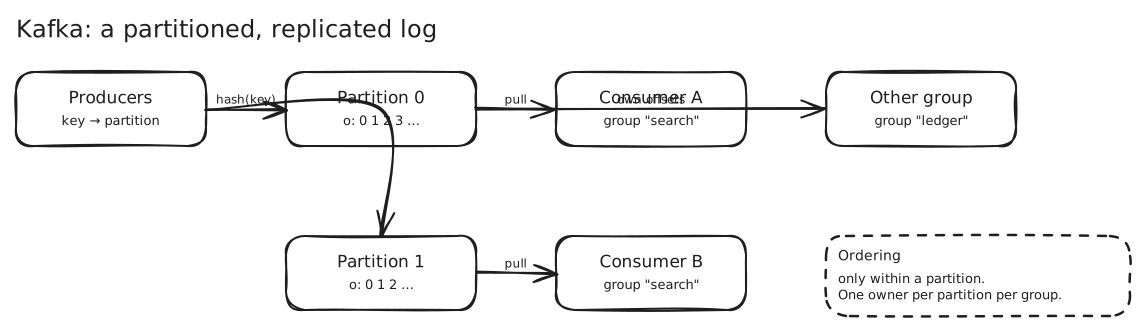
A topic is split into partitions. Each partition is an ordered sequence, and each message has an offset (its position). A consumer group shares a topic: Kafka gives each partition to exactly one consumer in the group, so consumers scale by adding members up to the partition count. A different group reads the same topic independently, from its own offsets.
That difference is the whole point. Adding a new consumer never changes producers, and a slow consumer can’t slow anyone else. It just falls behind (its lag grows), and Kafka is still holding the messages. → Message Queues · Publish-Subscribe · Message Brokers
Why it’s fast
Writes are sequential appends to disk, and reads are sequential too. No random seeks, no per-message index updates. The OS page cache does much of the work. A single partition commonly handles 50+ MB/s, and you add partitions to add throughput. In Ad Click Aggregator, 4 MB/s of clicks is a fraction of one partition.
Ordering and the partition key
Kafka guarantees order within a partition, not across a topic. So you choose the key: all messages with the same key go to the same partition, in order.
- Key by
chatIdand every message in a chat stays in order. - Key by
tweetIdfor even spread. Key byadIdto keep an ad’s clicks together, and accept that a viral ad makes a hot partition. - No key means round-robin: even load, no ordering, and downstream files scatter.
Two topics partitioned by the same key with the same partition count are co-partitioned, so a stream job can join them locally. That’s how Chat System joins messages with membership. The choice of key is the most important design decision you make with Kafka.
Durability and delivery
Each partition has a leader and followers (replication factor, usually 3). A write is acknowledged when enough in-sync replicas have it.
producer:   acks=all
topic:      replication.factor=3, min.insync.replicas=2
broker:     unclean.leader.election.enable=false
acks=all with min.insync.replicas=2 means an acknowledged write survives one broker dying. Disabling unclean leader election stops a stale follower from becoming leader and silently losing acknowledged data. With min.insync.replicas=1, acks=all can be satisfied by the leader alone.
Delivery semantics come from how consumers commit offsets.
- Process then commit: at-least-once (a crash between them means a replay).
- Commit then process: at-most-once (a crash loses the message).
- “Exactly-once” is at-least-once plus idempotent handling. Kafka has an idempotent producer and transactions for read-process-write within Kafka. Anything that touches an outside system still needs an idempotent write on your side. → Idempotency
Where it goes wrong
- Hot partitions: one key gets most traffic. Salt the key (
adId:0..N) and merge downstream. → Hotspots and Dynamic Resharding - Rebalancing: consumers joining or leaving pause consumption briefly while partitions are reassigned.
- Head-of-line blocking: one poison message blocks its partition. Send it to a dead-letter topic after N attempts.
- Retry with delay: you can’t sleep in a partition. Publish to a delay topic with a not-before time (10 s, 1 min, 10 min).
- Ordering across partitions: you don’t have it. If you need a total order, you have one partition and a throughput ceiling.
- Compaction: a compacted topic keeps only the latest value per key, which makes it a changelog for state (Kafka Streams recovery). → Stream Processing
When not to use it
For a job queue where you need per-message acks, priorities and delays, a task queue (SQS, RabbitMQ) fits more naturally. For a simple in-process fan-out, you don’t need it at all. Kafka earns its place when you want durable, replayable, high-throughput streams with several independent consumers, especially with change data capture off a database.
In an interview
Say why a log: decoupling, durability, replay, several consumers. Then name the key and what ordering it buys, and say how many partitions and why (throughput and consumer parallelism). Then say what you commit, and that your handlers are idempotent.
The trap is saying “Kafka gives exactly-once” without qualification.
Seen in
- News Feed — CDC from the posts table into fan-out consumers
- Ad Click Aggregator — the click log, and partitions aligned to the warehouse
- Notification System —
IncomingSegmentsandNotificationsToSend, retry and dead-letter topics - Chat System — co-partitioned message and membership streams
- Twitter Search — the indexing pipeline with bulk upserts
- YouTube — view events aggregated and salted per video
Related
Event-Driven Architecture · Event Sourcing · CQRS · Orchestration and Choreography