Stage 07 · Async and messaging
Message Queues
Some work doesn’t have to finish before you answer the user. A message queue is the piece of infrastructure that lets you write that work down somewhere durable, reply immediately, and have a different machine pick it up later.
It’s the simplest of the messaging primitives: one message goes to one consumer, and one chunk of work gets done.
A checkout that got slower every quarter
You run an online bookstore. POST /orders started life as a single database insert and took 40ms. Two years of feature requests later, the handler does this, top to bottom, while the customer waits:
- Charge the card — Stripe, ~700ms
- Decrement inventory — ~20ms
- Render a PDF invoice — ~2s
- Send the confirmation email — SendGrid, ~400ms
- Push the order to the warehouse partner’s API — ~1.5s on a good day
- Write a row to the analytics warehouse — ~200ms
Add it up and p50 checkout is around five seconds. p99 is whatever the warehouse partner feels like today.
Slow is the smaller problem. The bigger one is that you’ve chained your availability to five other systems. If SendGrid is having a bad morning, the email call times out, the handler throws, and the customer gets a 500 — after you already charged their card. Now you have money taken and no order.
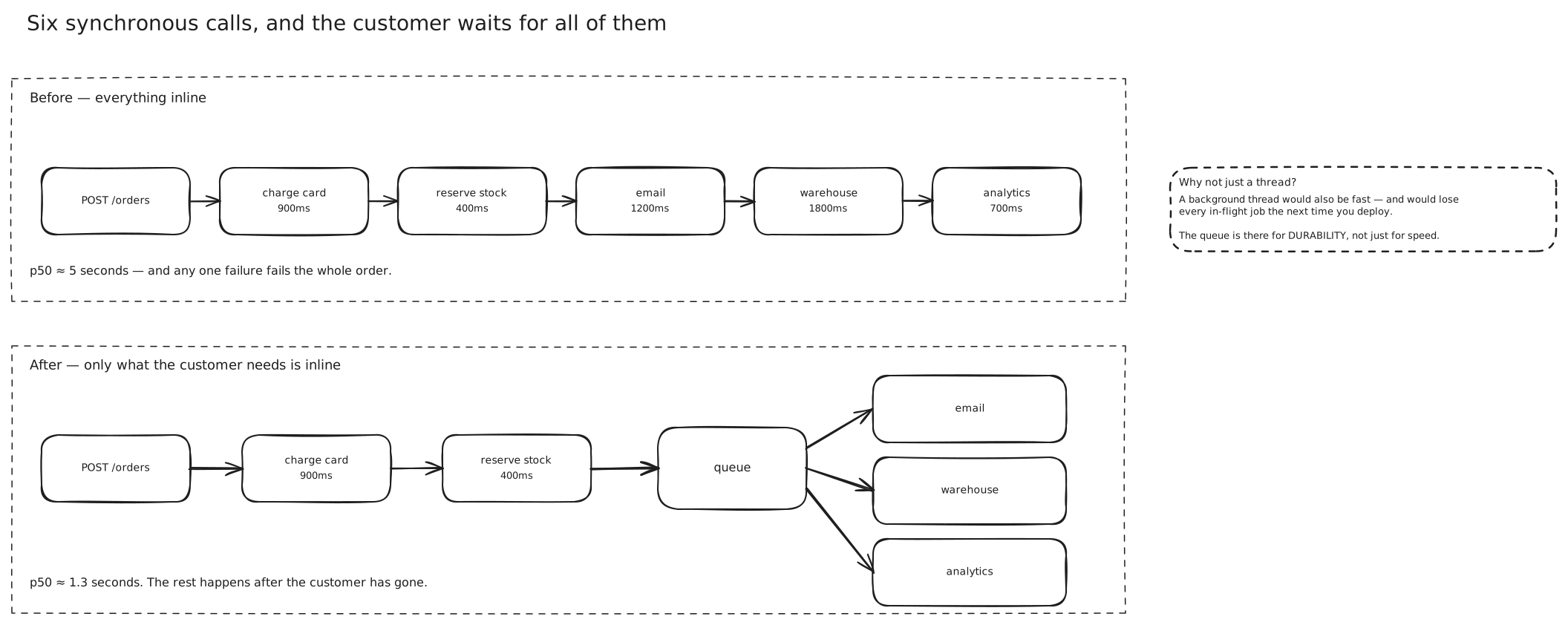
Which of these steps actually has to happen before you can say “order placed”?
Only the first two. The card has to clear and the stock has to be reserved, or you’ve sold a book you don’t have. Everything else just has to happen eventually. The customer doesn’t need the PDF to exist at the moment they see the confirmation page — they need it in their inbox within a minute or two.
The obvious async fix, and why it isn’t enough
So you make steps 3–6 asynchronous. You spawn a background thread, return 200 right away, and let the thread do the slow stuff. Checkout drops back to 60ms.
This works beautifully in staging. Then you deploy on a Friday afternoon.
Deploying rolls the pods. Twelve threads are halfway through their work when the process gets SIGTERM. Those twelve orders never get an invoice, never get an email, and never reach the warehouse. There is no record anywhere that the work was supposed to happen, because the only record was a stack frame in a process that no longer exists.
That’s the real requirement hiding inside “make it async”: the intention to do the work has to outlive the process that formed it. The work needs to be written down somewhere durable before you reply to the customer.
Producer, queue, consumer
A message queue gives you exactly that. The checkout handler becomes a producer: it does the two critical steps, appends a small message to a queue, and returns.
{ "type": "OrderPlaced", "orderId": "ord_9f31", "userId": 8812, "total": 3499 }The queue is a durable, usually replicated buffer that lives outside your service. A separate fleet of consumers pulls messages off it and does the slow work. The broker doesn’t lose the message when your web tier redeploys, because the message isn’t in your web tier.
Three things improved at once, and it’s worth separating them because interviewers will ask you to.
Latency dropped because you stopped making the customer wait on work they don’t care about yet. Availability improved because SendGrid being down no longer fails a checkout — it just means one message sits in the queue a bit longer. And coupling dropped: the checkout service no longer imports a SendGrid client or knows the warehouse partner exists.
Note what you gave up. The confirmation email is no longer guaranteed to have been sent when the API returns 200. You’ve traded a strong “it happened” for a weaker “it will happen.” Usually that’s the right trade. But it means the confirmation page can no longer say “we’ve emailed you” — it has to say “we’re emailing you” — and if the queue backs up for twenty minutes, that’s twenty minutes of customers wondering whether their order went through.
Competing consumers
Black Friday arrives. Orders come in at 2,000/second and your single consumer chews through maybe 50/second. The queue depth climbs into the millions and confirmation emails start arriving four hours late.
The fix is the whole reason queues are shaped the way they are. You start forty more consumers, all reading from the same queue. The broker hands each message to exactly one of them.
This is the competing consumers pattern, and it’s the defining property of a queue. Consumers don’t coordinate. They don’t partition the work between themselves. Each one just says “give me the next thing,” does it, and asks again. Adding capacity is kubectl scale.
It also load-balances better than a round-robin load balancer would, for a subtle reason. A consumer only asks for a new message when it’s finished the last one, so a worker that happened to draw a 400-page invoice naturally receives fewer messages than one drawing short ones. Pull-based work distribution is self-balancing in a way push-based distribution isn’t.
This one-message-one-consumer property is exactly what you don’t want when several different teams each need to see every order. That’s a different primitive — see Publish-Subscribe.
What happens when a consumer dies mid-message
A worker pulls the message for order ord_9f31, renders the PDF, and then its node gets preempted before it sends the email.
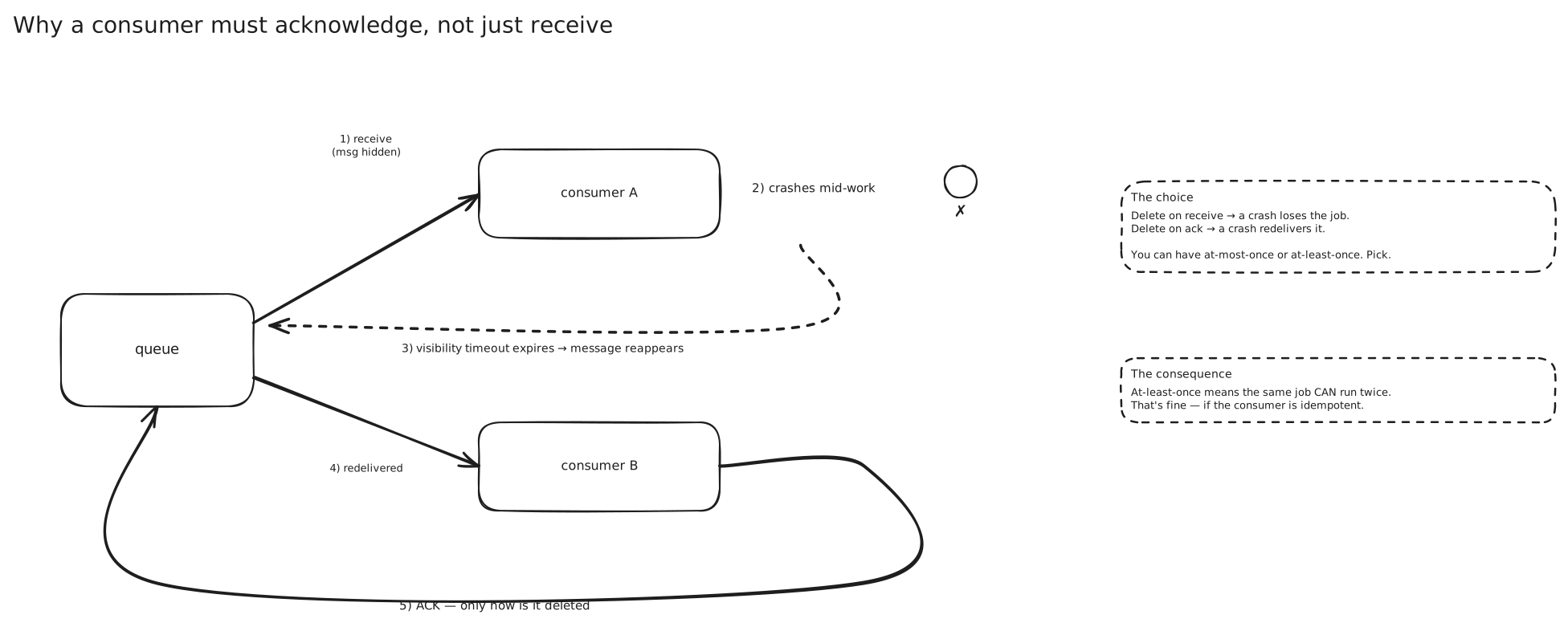
If the broker deleted the message the moment it handed it over, that order is gone. So brokers don’t do that. Delivery and deletion are two separate events, and the gap between them is where all the interesting behaviour lives.
When a consumer receives a message, the broker makes it invisible to other consumers for a configured window — SQS calls this the visibility timeout, and it defaults to 30 seconds. The message is still in the queue. It’s just hidden. The consumer must explicitly acknowledge it (in SQS, call DeleteMessage) to remove it for good. If the acknowledgement never comes, the timeout expires, the message reappears, and some other consumer picks it up.
t=0    consumer A receives msg → msg hidden, timer starts (30s)
t=12   consumer A crashes
t=30   timeout expires → msg visible again
t=31   consumer B receives msg → does the work → DeleteMessage → gone
Now you have a tuning problem with a wrong answer on both sides.
Set the visibility timeout too short and a slow-but-healthy consumer gets its message stolen while it’s still working on it. Two workers now render the same invoice, and if the job isn’t idempotent you email the customer twice.
Set it too long and a genuine crash means the message sits invisible for that whole window before anyone retries it. SQS caps the visibility timeout at 12 hours, and a 12-hour retry delay is not a retry, it’s an outage.
The practical answer for variable-length jobs is a heartbeat: the consumer periodically extends the timeout while it’s still working (ChangeMessageVisibility in SQS). Start the timeout at roughly your p99 processing time and extend from there.
At-most-once, at-least-once, and the thing called “exactly-once”
That ack protocol has a knob in it, and the knob is when you ack.
Ack on receive, then process. If the consumer dies mid-work, nobody retries, because the broker already considers the message done. Every message is delivered zero or one times: at-most-once. This is cheap and it’s what Redis Pub/Sub gives you — the docs are blunt that if the subscriber can’t handle the message, “the message is forever lost.” Fine for a metrics sample. Not fine for a payment.
Process, then ack. If the consumer dies mid-work, the timeout fires and the message comes back. Every message is delivered one or more times: at-least-once. This is the default for SQS, Kafka, RabbitMQ and Google Pub/Sub, and it’s what you want almost always.
At-least-once means duplicates are not an edge case. They’re a normal Tuesday. A consumer that crashes after charging a card but before acking will see that message again, and if the handler isn’t idempotent it charges the card twice.
Which means the real answer to duplicates isn’t a broker setting. It’s Idempotency in the consumer. Give each message a stable business key, record what you’ve already done against that key in durable storage, and make the second delivery a no-op that returns the first result. At-least-once delivery makes an idempotent consumer mandatory, not optional.
SQS FIFO queues do offer a deduplication ID with a five-minute window, and Kafka has idempotent producers with transactional commits. Both are genuinely useful. Neither removes your obligation to write the consumer so a replay is harmless.
| Guarantee | Ack timing | You must handle | Reach for it when |
|---|---|---|---|
| At-most-once | before processing | silent message loss | telemetry, presence pings, live dashboards |
| At-least-once | after processing | duplicate processing | almost everything — with an idempotent consumer |
| “Exactly-once” | atomic commit of result + offset | the boundary where it stops holding | stream processing entirely inside one broker’s world |
Retrying without knocking over the thing you’re retrying
The warehouse partner’s API goes down for 90 seconds. Ten thousand messages are in flight, every one of them fails, and every one comes back after the visibility timeout.
If all ten thousand consumers retry immediately, you’ve built a synchronised hammer. The partner’s API comes back up, takes ten thousand simultaneous requests, falls over again, and you’ve turned a 90-second blip into a sustained outage. This is a retry storm, and queues make it easier to cause because they concentrate retries.
The first fix is exponential backoff: wait 1s, then 2s, then 4s, then 8s, doubling up to a cap. Spreading the retries out gives the downstream service room to recover.
Backoff alone isn’t enough, though. All ten thousand messages failed at roughly the same instant, so they all wait 1s and retry at roughly the same instant, then all wait 2s. Exponential backoff without randomisation just makes the hammer slower, not softer.
The second fix is jitter — randomise each wait so the herd decorrelates:
# full jitter: pick uniformly from [0, capped exponential]
delay = random.uniform(0, min(cap, base * 2 ** attempt))
Marc Brooker’s AWS Architecture post is the canonical write-up, and the formulas from it are baked into the AWS SDKs’ standard retry mode. The one-line version: exponential backoff controls how much load you send, jitter controls when, and you need both.
Two things worth adding on top. Cap the number of attempts — infinite retries are how a queue eats itself. And if the downstream is genuinely down rather than flaky, stop calling it at all: that’s a circuit breaker, and it belongs in front of the client, not in the retry loop.
Poison messages and the dead-letter queue
Some messages will never succeed. A malformed payload from an old producer version. An order referencing a product row that got hard-deleted. A payload that trips a null-pointer bug in your handler.
Retrying these is worse than useless. The message fails, comes back, fails, comes back — forever. It burns consumer capacity, it fills your error logs, and because a FIFO queue processes in order, one poison message can block everything queued behind it. This is a poison message.
The standard containment is a dead-letter queue: a second, ordinary queue where messages go after they’ve failed too many times. In SQS you configure a redrive policy with a maxReceiveCount — say 5 — and on the sixth receive the broker moves the message to the DLQ instead of redelivering it.
Nothing consumes the DLQ automatically. That’s the point. It’s a durable, inspectable pile of things that went wrong, and somebody looks at it. The useful habit is to alarm on DLQ depth greater than zero, because a message arriving there is almost always a bug you want to know about within minutes rather than at the next retro.
Once you’ve fixed the bug you redrive — move the messages back onto the main queue and let them process normally. Which only works if the messages are still there, so watch retention: SQS keeps a message for 4 days by default and 14 days at most, and a DLQ message that ages out is data you have permanently lost.
Ordering, and what it costs
By default, a scaled-out queue does not preserve order. SQS standard queues say so explicitly: they’re distributed across many machines, so a message sent second can easily be delivered first. With forty competing consumers, even a perfectly ordered delivery wouldn’t stay ordered — worker 12 might finish its message after worker 30 finishes the one that came later.
Usually this doesn’t matter, because the messages are independent. Invoice 9f31 and invoice a02b have nothing to say to each other.
Sometimes it does. If you emit AddressUpdated then OrderShipped, processing them backwards ships to the old address. If you emit ItemAdded then ItemRemoved for a cart, processing them backwards leaves an item in the cart forever.
The instinct is to ask for a globally ordered queue. Resist it. Global ordering means a single point through which every message must pass in sequence, which is the definition of a throughput ceiling.
What you actually need is ordering per key — per cart, per order, per customer. Every system that offers ordering offers it at exactly this granularity, because it’s the granularity you can scale.
SQS FIFO queues take a MessageGroupId. Order is strict within a group and unrelated across groups, so different groups run in parallel. Kafka does the same thing with partitions: order is guaranteed within a partition, and the message key decides the partition (Message Brokers has the mechanics).
The cost is real and you should know the numbers. An SQS FIFO queue is limited to 300 transactions per second per API action per partition — 3,000 messages/second if you batch ten at a time. A standard queue has no meaningful limit. High-throughput mode for FIFO lifts this substantially (up to 70,000 TPS unbatched in the largest regions, but only 2,400 TPS by default in smaller ones), and it works by spreading message groups across more partitions — which is another way of saying the throughput you get is proportional to how many independent ordering keys you have.
The other cost is head-of-line blocking. Within a group, one stuck message blocks every message behind it, because releasing them would break the ordering you asked for. Order and isolation are in direct tension, and a single high-volume group — one whale customer, one hot product — is a hotspot with a queue in front of it.
Backpressure, and the queue as a shock absorber
A flash sale hits and traffic goes 20x for ten minutes. Without a queue, that surge lands directly on your payment provider, your inventory database and your warehouse partner, and one of them falls over.
With a queue in between, the surge lands in the queue. Consumers keep working at their own steady rate. The queue depth spikes to a few hundred thousand and drains over the next half hour. Nothing broke; some emails were fifteen minutes late.
That’s load levelling, and it’s a genuine architectural reason to introduce a queue even when latency isn’t the motivation. A queue turns a traffic spike into a latency spike, which is very often a trade you’ll take. It’s also the cleanest way to respect a downstream API’s rate limit — consumers pull at a fixed rate rather than hammering (Rate Limiting).
The queue also gives you honest backpressure — but only if you watch it. A queue that grows unboundedly isn’t absorbing load, it’s hiding a capacity shortfall and converting it into an ever-growing delay. Two rules keep you out of that: alarm on the age of the oldest message, not just depth; and decide in advance what happens when the queue is genuinely full. Reject new work at the edge, or shed low-priority messages, but decide it before it happens rather than during.
Where this shows up
- Video and image processing. Upload writes the file to blob storage and enqueues a transcode job. The user sees “processing” immediately instead of holding a connection open for four minutes.
- Email, SMS and push notification fan-out. Every third-party notification provider is slower and flakier than your own database, and none of them belongs on a request path.
- Payment and order fulfilment. Charge synchronously because the user needs to know; do everything downstream of the charge through a queue.
- Ingesting from a burst-prone source. IoT fleets, webhook receivers and log shippers all deliver in spikes that a queue smooths into a steady drain rate.
In an interview
Bring up a queue the moment you notice a step on the write path that the user doesn’t need the result of. Say which steps stay synchronous and why — that’s the part that shows judgement, not the queue itself.
Expect to be pushed on failure. “What if the consumer crashes halfway?” is asking for visibility timeout and at-least-once redelivery. “So you might process it twice?” is asking for idempotency, and the answer is a business key plus durable dedup state, not “we’ll use exactly-once.”
Name a DLQ before they ask. Most candidates design the happy path and leave poison messages to retry forever.
The most common mistake is reaching for a strictly ordered FIFO queue by reflex. Ask what actually needs ordering, scope it to a key, and mention the throughput ceiling you just accepted.
Seen in
- 05 - Matching and Real-Time Push — ride requests on a partitioned queue with the offset committed only after a successful match, so a crashed matcher’s work gets redelivered
Related
Publish-Subscribe · Message Brokers · Orchestration and Choreography · Event-Driven Architecture · CQRS · Idempotency · Rate Limiting · Circuit Breakers · Avoiding Distributed Transactions