Stage 03 · Scaling data
Handling Large Blobs
Someone uploads a 4 GB video. The naive design POSTs it to an API server, which forwards it to storage. At a few hundred uploads a second your servers are saturated moving bytes they don’t care about, one connection drop wastes the whole thing, and the database holds a blob it can’t index.
Large files (images, video, documents, backups) are a different kind of data from the small rows the rest of the system handles, and the pattern for them is nearly the same everywhere.
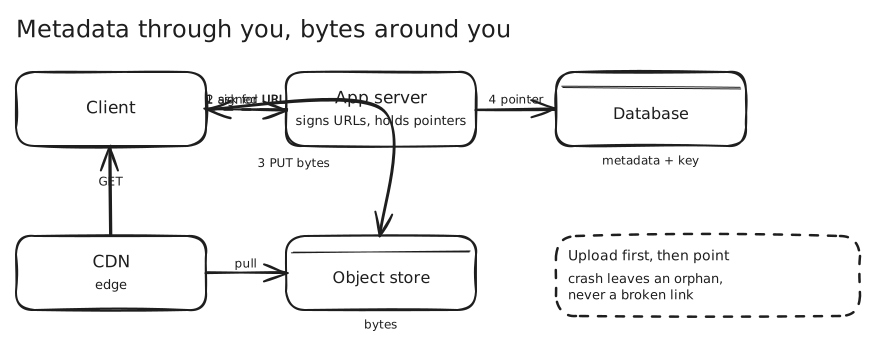
The rule: metadata in the database, bytes in an object store
Put the file in object storage (S3, GCS, Azure Blob): cheap, durable, effectively unlimited, built for large immutable objects. Put a pointer and the metadata (owner, size, type, status, expiry) in your database.
Why not the database? A 100 KB row poisons the cache (an 8 KB page fits about a hundred small rows but only a fraction of one big one), lengthens lock hold times, and makes replication expensive: 22.8 MB/s of new pastes, times three replicas, is a cloud bill line. → PasteBin · Storage
Upload around your servers
Pre-signed URLs. The client asks your server for permission; the server signs a URL that grants one operation on one object key until an expiry; the client PUTs the bytes directly to S3. Your server handles a few hundred bytes of signature, and S3 handles the file. You keep the authorisation decision and shed the data path.
Big files: multipart and resumable. A single PUT tops out at 5 GB, and an hour-long request is an hour of exposure to a network blip. Multipart upload splits the file into parts (5 MiB to 5 GiB, up to 10,000 parts), uploads them in parallel, and completes with the list of part numbers and ETags. Track part status so a resume skips completed parts. Request pre-signed part URLs lazily, since they expire. Trust but verify: before completing, call ListParts, don’t believe the client. Add a lifecycle rule to abort incomplete uploads. → Google Drive
Chunk for edits. If files change, splitting them into content-defined chunks (with a rolling hash) means an edit uploads and stores only the changed chunk. Name chunks by their content hash and uploads become idempotent. → Google Drive
Order the two writes
Creating a file writes to the object store and the database, and no transaction spans both. Whichever goes first, a crash can land in between. So order them so the failure is harmless.
- Upload first, then create the pointer: a crash leaves an orphan object that nothing points at (invisible, cleaned up later).
- Pointer first: a crash leaves a broken link that users see.
Write the thing that’s useless alone before the thing that makes it reachable. Then garbage-collect the orphans (below). → PasteBin
Deliver through a CDN
For reads, put a CDN in front of the store. Immutable objects cache without invalidation, egress is billed once per edge rather than per view, and users are served from nearby.
- Head versus tail: popular objects go on the CDN; the long tail is served from your own storage servers because they’d be evicted before a second hit. → YouTube
- Private content: signed, expiring download URLs (or signed cookies) instead of public buckets.
- Byte ranges: support
Rangerequests so players and downloaders can seek and resume.
Process asynchronously
Big files usually need processing (transcoding, thumbnails, virus scan, OCR). Don’t do it in the upload request. Emit an event when the upload completes and run a pipeline of small idempotent tasks with durable state. → Long-Running Tasks · Durable Execution and Sagas
Expiry and cleanup
Object stores bill per GB per month forever, so a leak is a recurring cost (57 TB a month at $0.02/GB accumulates to about $8 million over ten years).
- Lifecycle rules are the simplest answer: expire by prefix, transition to cold storage, abort incomplete uploads.
- For arbitrary expiry times, put the expiry in the object’s name (a fixed-width timestamp prefix; S3 lists keys in lexicographic order) so a sweep reads oldest-first from S3 alone, without depending on database rows that may already have been reclaimed.
- Reference counting for shared chunks races with a live writer; use a grace period.
Security and cost notes
- Don’t trust the client’s content type or size; validate after upload (and scan).
- Cross-user dedup by hash turns a fingerprint into a password to the content. Restrict it, or verify possession.
- Egress dominates cost at scale: 7.5 PB a day at $0.02/GB is about $150,000 a day, so codecs, tiering and CDN placement matter.
In an interview
Say the pattern in one line, then the upload path (pre-signed, multipart, direct), the write ordering, the CDN, and the cleanup. Do the bytes-per-second number, since request rate alone hides the problem.
The trap is streaming files through your application servers, or storing them in the database.
Seen in
- PasteBin — pre-signed direct upload, upload-then-claim, CDN, expiry-prefixed keys
- Google Drive — content-defined chunks, multipart and resumable uploads, dedup security
- YouTube — multipart upload, then a transcoding DAG, then segment delivery from the CDN
- Instagram — image variants, feed delivery from the CDN
- Local Delivery Service — product images at the edge
Related
Storage · CDN · Idempotency