Stage 01 · Foundations
Storage
Every system eventually has to put bytes somewhere they’ll survive a restart. The interesting question is never “which disk” — it’s what shape of access you need, how fast you need it, and how badly you’d mind losing the data.
Your photos have to live somewhere
Say you’re building a photo-sharing site. Users upload JPEGs and you serve them back.
The first version is the obvious one. The web server writes the file to /var/www/uploads/, saves the path in a database row, and serves it from local disk on the next request. This is fast — no network hop, no extra system — and for a single server it is completely correct.
Then traffic grows and you put a second web server behind a load balancer.
A user uploads to server A. Their very next request lands on server B. Server B goes looking for /var/www/uploads/abc.jpg, doesn’t find it, and returns a 404. You’ve just discovered that local disk is per-machine state, and the entire reason you added a second machine was to make machines interchangeable. → Load Balancing
Attempt one: give the disk a network address
The narrow fix is to stop keeping bytes on the machine and keep them on a disk that lives on the network instead. That’s block storage: AWS EBS, GCP Persistent Disk, an iSCSI LUN in a data centre.
A block device has no idea what a file is. It exposes a flat array of fixed-size blocks — 512 bytes or 4 KB each — and exactly two operations: read block N, write block N. Directories, filenames, permissions, “this file is 3 MB long” — all of that is the filesystem’s invention, and the filesystem is code running on whichever machine mounted the device.
Which is precisely why block storage doesn’t solve our problem. The filesystem keeps block state in the mounting machine’s memory: inode tables, free lists, the journal. Two machines mounting the same block device with ext4 would each believe they owned that cache, and they’d corrupt each other within seconds. So a block volume attaches to one instance at a time.
What it does buy you is that the disk outlives the instance. Terminate the VM, attach the volume to a new one, and the data is still there. And because it looks like an ordinary local disk, software runs on it unmodified — most importantly a database, which wants to control its own page layout and its own fsync calls. That’s what block storage is for: it’s the substrate underneath a single stateful process.
Attempt two: a filesystem that’s shared on purpose
If the problem is that filesystem state lives inside one machine’s kernel, the fix is to move the filesystem itself onto the network and have every machine talk to it over a protocol.
That’s file storage: NFS, SMB, AWS EFS, an on-prem NAS. A server owns the directory tree and the locking, and clients send it OPEN, READ, WRITE, LOCK over the wire. Now ten web servers mount the same export and all of them see abc.jpg.
This genuinely works, which is why NFS has survived since 1984. You keep the full POSIX contract: writes into the middle of an existing file, rename() as an atomic operation, directory listings, byte-range locks. Applications that assumed a local disk don’t notice anything changed.
The bill arrives in two parts. First, every one of those POSIX operations is now a network round trip, and a round trip inside a data centre is roughly 500 microseconds — slower than reading 4 KB off a local SSD. An application that stats a thousand files to render a page just turned half a second of syscalls into half a second of network. Second, the directory tree is a shared mutable structure: ten thousand clients creating files in one directory all contend on the same metadata, and that metadata path becomes the wall you can’t scale past.
Attempt three: stop pretending it’s a filesystem
Here’s the observation that changes the whole picture. Look at what the photo service actually does with a JPEG:
- writes it once, complete, in a single shot
- reads the whole thing back, many times
- occasionally deletes it
It never appends. It never writes forty bytes into the middle. It never renames. It never takes a byte-range lock. We were paying for the entire POSIX contract and using maybe four percent of it.
Object storage throws the rest away. S3, GCS, Azure Blob. The model is a flat namespace of keys mapped to immutable blobs, with an HTTP API: PUT key, GET key, DELETE key, LIST prefix. There are no directories — photos/2024/abc.jpg is one key that happens to contain slashes. There are no partial writes: you replace the entire object or you leave it alone. There is no rename, only copy-then-delete.
Every one of those removals buys something concrete.
Because objects are immutable, the system can replicate a blob across three availability zones without ever having to reconcile two writers who disagree about byte 4,096. Reconciliation is the hard part of distributed storage, and immutability deletes the problem rather than solving it.
Because there’s no directory tree, there’s no shared mutable structure to contend on. S3 sustains at least 3,500 PUT/DELETE and 5,500 GET requests per second per partitioned prefix, and there’s no limit on how many prefixes a bucket has. Ten prefixes read in parallel is 55,000 reads per second.
Because the API is plain HTTP, a browser can fetch the object directly with a pre-signed URL and your servers never touch the bytes at all. That’s a bandwidth bill and a CPU bill that simply disappear. → CDN
And the durability is in a different category. S3 Standard stores every object redundantly across a minimum of three availability zones and is designed for 99.999999999% durability — eleven nines — with 99.99% availability over a year.
What you pay for all of this is latency. Small-object first-byte latency on S3 is roughly 100–200 ms, which is four to five orders of magnitude worse than the local SSD you started with. Object storage is right for bytes you fetch occasionally or serve through a CDN. It is never right for a database’s data files.
It’s worth seeing the three side by side, because the difference is where the boundary sits:
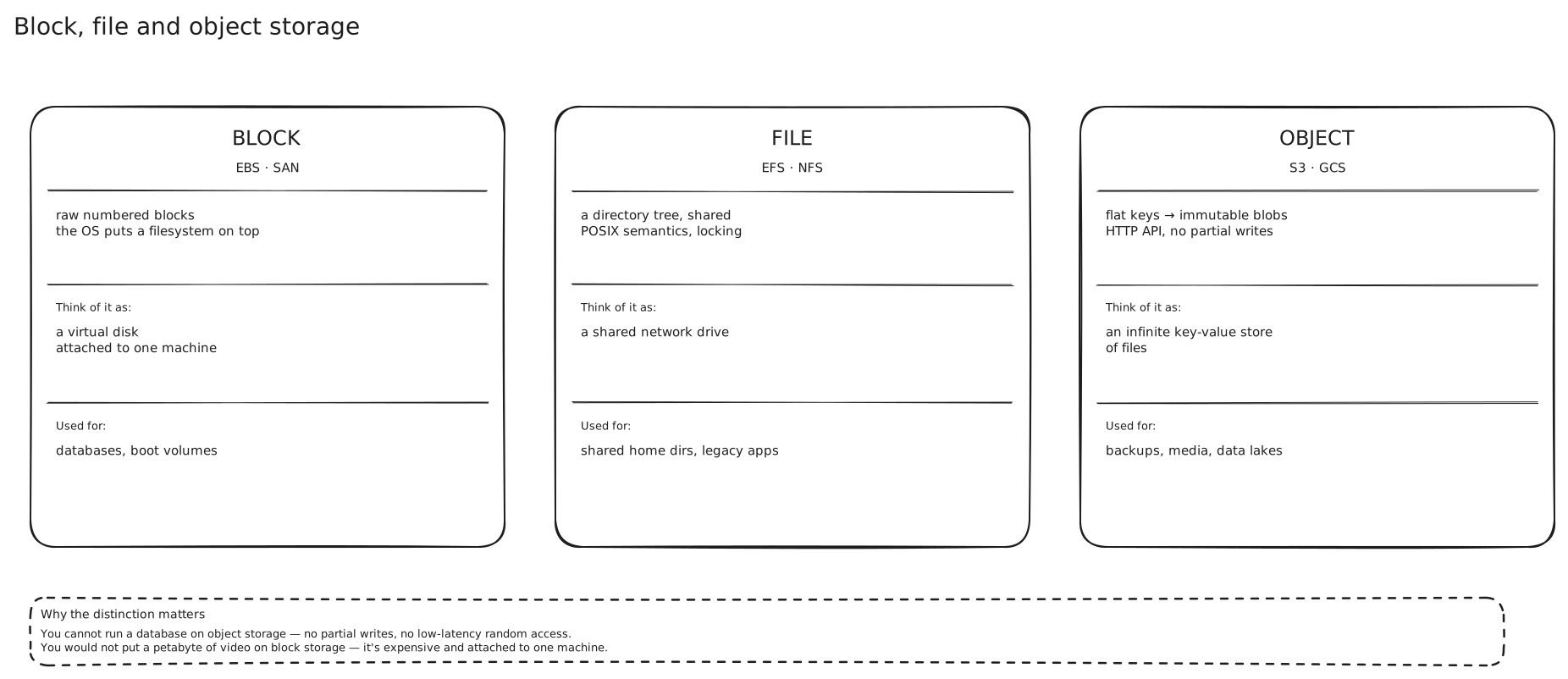
The filesystem is the piece that moves. In block storage it lives on your machine, so only your machine can mount the volume. In file storage it lives on the server, so everyone can. In object storage there isn’t one at all, and that absence is what makes the rest of it scale.
Now the three-way comparison earns its place:
| Block (EBS) | File (EFS, NFS) | Object (S3) | |
|---|---|---|---|
| Unit | fixed-size block | file in a tree | key → immutable blob |
| Access | one instance mounts it | many clients mount it | anyone with HTTP + credentials |
| Partial writes | yes | yes | no — replace the whole object |
| Good for | database data files, boot volumes | shared config, home directories, lift-and-shift | media, backups, logs, data lakes |
| Latency | sub-millisecond | ~1 ms + round trips | ~100–200 ms first byte |
The pattern to carry away: each step down that table gives up a piece of the POSIX contract, and gets scale and durability in exchange. Pick the weakest contract your access pattern actually needs.
The disk underneath, and why the numbers are the design
Every argument above rests on latency, so it’s worth having the ladder memorised. These are the orders of magnitude from the “latency numbers every programmer should know” list — treat them as magnitudes, not measurements:
L1 cache reference                        0.5 ns
Branch mispredict                           5 ns
L2 cache reference                          7 ns
Mutex lock/unlock                          25 ns
Main memory reference                     100 ns   ─┐ RAM
Compress 1 KB                           3,000 ns    │
Send 1 KB over 1 Gbps network          10,000 ns    │
Read 4 KB randomly from SSD           150,000 ns   ─┤ flash
Read 1 MB sequentially from memory    250,000 ns    │
Round trip within same datacenter     500,000 ns   ─┤ network
Read 1 MB sequentially from SSD     1,000,000 ns    │
Disk seek                          10,000,000 ns   ─┤ spinning rust
Read 1 MB sequentially from disk   20,000,000 ns    │
Packet CA → Netherlands → CA      150,000,000 ns   ─┘ WAN
The ratios are what matter, and they’re easier to feel if you scale them up. Call a main-memory reference one second. Then a random SSD read is about a day and a half. A data centre round trip is just under two months. A disk seek is three and a half years. And a round trip from California to the Netherlands is fifty years.
Three consequences fall straight out of that ladder.
A network hop costs more than a local flash read. 500 µs versus 150 µs. That’s why a network-attached block volume can never match local NVMe on latency no matter how good the storage backend is, and why “just put a cache in front of it” is only a win if the cache is closer than the thing it’s caching. → Caching Strategies
Sequential beats random by a lot, and by far more on disk than on flash. Reading 1 MB sequentially from disk costs 20 ms; doing it as 250 random 4 KB reads costs 250 seeks, or 2.5 seconds. On SSD the same comparison is 1 ms versus 37 ms. Storage engines are built almost entirely around this asymmetry — it’s why write-ahead logs are append-only and why LSM trees exist at all. → Databases and DBMS
Cross-region is a different universe. 150 ms is fifteen disk seeks. Any design that makes a synchronous cross-region call on the request path has already decided its p99, whatever else it does.
What each medium is actually made of
Spinning disk (HDD) has a physical arm. Getting to a random location means moving that arm and waiting for the platter to rotate under it — that’s the ~10 ms seek, and it’s mechanical, so it hasn’t improved much in twenty years. Sequential throughput is fine and cheap per byte. AWS’s throughput-optimised HDD volumes cap out at 500 IOPS and 500 MiB/s. Five hundred operations per second, from a whole disk.
SSD has no arm. A random read is a lookup in a flash translation layer and a page read — around 150 µs in the classic list, and modern devices are faster. AWS’s gp3 general-purpose SSD does 80,000 IOPS and 2,000 MiB/s. That’s a 160× improvement in random operations over the HDD volume, on the same cloud, for the same abstraction.
NVMe is the part people get wrong: it is a protocol, not a medium. The old SATA/AHCI interface was designed around a spinning disk and gives you one command queue, 32 commands deep. NVMe gives you up to 65,535 queues of up to 65,535 commands each, one per CPU core, with no lock between them. Under a single-threaded workload NVMe is somewhat faster than SATA flash; under heavy concurrency it’s several times faster, because SATA’s queue saturates and NVMe’s doesn’t. When you see “NVMe” on an instance type, read it as “flash that can absorb your whole thread pool at once.”
RAM is 100 ns, volatile, and expensive per byte. The reason a database’s buffer pool matters so much is right there in the ladder: a cache hit is 100 ns and a miss is 150,000 ns. A working set that fits in memory and one that doesn’t are different systems with the same code.
Network-attached storage adds a round trip to everything. AWS io2 Block Express — the top of the provisioned-IOPS line, at 256,000 IOPS and 4,000 MiB/s — is designed for an average latency under 500 microseconds. That’s excellent for something on the other end of a network, and still slower than a local SSD read.
RAID, briefly
One disk dies and you lose everything on it. RAID is the standard answer: combine several physical disks into one logical device so that the array survives failures the individual disks don’t.
- RAID 0 (striping). Data is split evenly across all drives. Full capacity, best throughput, and zero fault tolerance — losing any one drive loses the array. RAID 0 makes you strictly less safe than a single disk, since the failure probability compounds.
- RAID 1 (mirroring). Every drive holds an identical copy. Survives losing a drive, reads can be served from either copy, and you use 50% of your capacity.
- RAID 5 (striping with parity). Minimum three drives; parity is distributed across them. Survives one drive failure at 67–94% capacity utilisation. The catch is the rebuild: reconstructing a failed drive reads every remaining drive end to end, which is both slow and exactly when a second drive is most likely to die.
- RAID 6. Parity written to two drives, so it survives two simultaneous failures. Minimum four drives. This is what you use once drives get large enough that rebuild time is measured in days.
- RAID 10. Mirrored pairs, striped. Best performance and simple rebuilds, at 50% capacity.
The thing to be clear about is what RAID gives you and what it doesn’t. RAID protects against a disk failing. It does not protect against the machine dying, the rack losing power, the data centre flooding, a bad deploy issuing DELETE FROM orders, or ransomware. A mirrored write is mirrored instantly, including the mistaken one. RAID is an availability mechanism; backups and replicas are the durability mechanism. → Disaster Recovery, Replication and Read Consistency
Durability and availability are different questions
These two get used interchangeably, and they answer completely different things.
Durability asks: if I wrote this byte, will it still exist later? Availability asks: can I read it right now?
You can have either without the other. A tape in a vault is extremely durable and entirely unavailable for the four hours it takes to fetch it. A RAID 0 array in memory is instantly available and one power cut from gone. S3 publishes both numbers separately for exactly this reason: eleven nines of durability, and 99.99% availability. Those aren’t the same claim — the second one says S3 will be unreachable for roughly 53 minutes a year, during which your objects are perfectly safe and perfectly useless. → Availability, SLA SLO SLI
The gap between those two numbers is where the useful thinking happens, and the cloud’s own figures make it concrete. AWS documents gp3, gp2, io1, st1 and sc1 EBS volumes at 99.8%–99.9% annual durability, which they spell out as a 0.1%–0.2% annual failure rate. Only io2 Block Express reaches 99.999%.
Sit with the gp3 number for a second. If you run a fleet of 1,000 gp3 volumes, a 0.2% annual failure rate means you should expect to lose about two volumes a year. Not “in a catastrophe” — as ordinary Tuesday-afternoon behaviour. Compare that to S3’s eleven nines, where the expected loss across ten million objects is one object every ten thousand years.
That difference isn’t AWS being careless with EBS. It’s structural: an EBS volume is replicated within one availability zone, because it has to serve sub-millisecond writes and cross-AZ replication costs a round trip. S3 replicates across at least three AZs, because it’s allowed to take 100 ms. You bought the latency with durability. That’s why every serious EBS-backed system snapshots to S3 — you use fast single-AZ storage for the live workload, and slow multi-AZ storage for the copy that has to survive.
Where this shows up
- Any upload feature. Photo, video, document and avatar uploads go to object storage with a pre-signed URL so bytes never pass through your servers, and the database stores only the key.
- Database hosting. RDS, Cloud SQL and self-hosted Postgres all sit on provisioned-IOPS block storage, and the IOPS ceiling of that volume is frequently the real write limit of the system. → SQL Databases
- Data lakes and analytics. Parquet files on S3 queried by Athena, BigQuery or Spark — object storage as the durable layer, compute attached and detached at will.
- Container images and artifacts. Immutable blobs addressed by content hash is exactly the object-storage model, which is why every registry is built on it. → VMs and Containers
In an interview
Bring storage up the moment the design involves files, media or large blobs — say “these go to S3, the database holds the key and metadata” and move on, because it’s a two-sentence decision and interviewers expect it.
The push you should expect is “why not store the image in the database?” The answer is concrete: blobs bloat every backup and every replica, they evict useful pages from the buffer pool, and the database can’t serve them over a CDN.
Know the latency ladder to one significant figure. Being able to say “a data centre round trip is about 500 µs, so this cache saves us nothing” is the kind of specificity that separates a Staff answer from a Senior one. → Scalability
The most common mistake is treating durability and availability as one property. If you claim “eleven nines” for a system, be ready to say eleven nines of what, and what happens during the hour a year it’s unreachable.
Seen in
- PasteBin · Why Pastes Don’t Go in the Database — large immutable blobs belong in object storage, with only metadata in the database
- Web Crawler · Requirements — 30 PB of raw pages is a blob-store problem from the first estimate
- Google Drive · Why Files Are Split Into Chunks — chunking files into content-addressed blocks makes upload, dedup and sync cheap
- LinkedIn · Search with the Graph — the search index is built like an LSM tree: memtable, immutable segments, compaction
Related
Databases and DBMS · CDN · Caching Strategies · Availability · Disaster Recovery · Replication and Read Consistency · SLA SLO SLI
Sources
- Latency Numbers Every Programmer Should Know (Norvig / Dean gist)
- AWS — Amazon EBS volume types
- AWS — Data protection and durability in Amazon S3
- AWS — Best practices design patterns: optimizing Amazon S3 performance
- Karan Pratap Singh — System Design: Storage
- Interactive latency numbers by year — Colin Scott