Stage 02 · The database core
SQL Databases
A relational database is two ideas bolted together: a data model that says each fact lives in exactly one place, and a query engine that lets you ask questions nobody anticipated. Most of what people call “SQL doesn’t scale” is really a statement about one specific subsystem, and it’s worth knowing which.
One big table, and what goes wrong
You’re building the back end for an online store. The simplest possible data model is one table with everything in it:
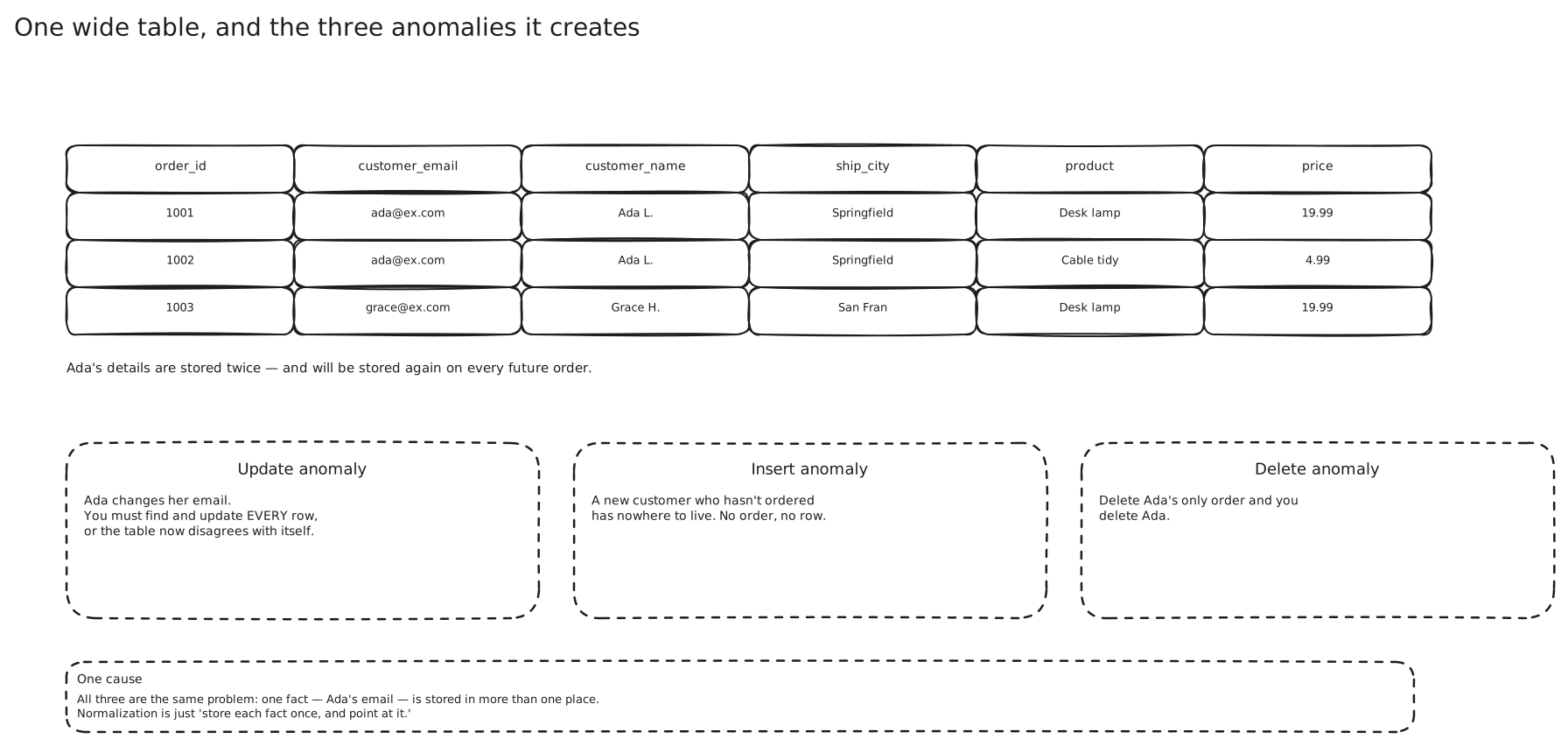
This is fine for a week. Reading an order is one row. Writing one is one insert. No joins, no foreign keys, nothing to explain.
Then Ana moves house.
Her address is duplicated across every order she’s ever placed — say four hundred of them. Updating it means an UPDATE over four hundred rows, and if that update is interrupted halfway, some of her orders now say Gower St and some say the new place, and nothing in the system can tell you which is correct. There’s no authoritative copy. Every copy is equally official.
It gets worse in a quieter way. A customer who’s browsing but hasn’t ordered yet can’t be represented at all — the only place a customer exists is inside an order row. And when the same product is spelled KB-8823 in one row and KB8823 in another, your “sales by product” query silently reports two products.
The fix is to give every fact exactly one home. Customers go in a customers table. Products go in a products table. An order stops carrying a copy of the address and carries a reference instead:
CREATE TABLE customers (
  customer_id  BIGSERIAL PRIMARY KEY,
  email        TEXT NOT NULL UNIQUE,
  name         TEXT NOT NULL
);

CREATE TABLE orders (
  order_id     BIGSERIAL PRIMARY KEY,
  customer_id  BIGINT NOT NULL REFERENCES customers(customer_id),
  product_sku  TEXT   NOT NULL REFERENCES products(sku),
  placed_at    TIMESTAMPTZ NOT NULL DEFAULT now()
);
Ana moving house is now a one-row update, and it’s atomic by definition because it’s one row. That’s the relational model’s actual promise: changes to a fact cost one write, regardless of how many things reference it. → Normalization and Denormalization
Constraints are invariants, not decoration
Look again at email TEXT NOT NULL UNIQUE. It’s easy to read that as documentation. It isn’t — it’s the only thing that actually works.
Here’s the version most people write first, in application code:
existing = db.query("SELECT 1 FROM customers WHERE email = %s", email)
if not existing:
    db.execute("INSERT INTO customers (email, name) VALUES (%s, %s)", email, name)
Two signup requests for ana@x.com arrive 3 ms apart and land on two application servers. Both run the SELECT. Both see nothing. Both insert. You now have two Ana accounts, her orders are split across them, and no amount of care in the application would have prevented it, because the gap between the check and the insert is where the race lives.
The UNIQUE constraint closes it, because the database enforces it at the moment of the write, under its own locks. The second insert fails with a constraint violation and your code catches it and treats it as “already exists.”
That’s the general shape of what constraints buy you. NOT NULL, CHECK (total >= 0), UNIQUE, and REFERENCES are invariants enforced at the storage layer, which means they hold no matter what writes: your service, the other team’s service, a migration script, someone in a psql session at 2 a.m. Every class of bug that would have produced corrupt data produces an error instead.
Joins, and the planner that runs them
Normalising means the address is somewhere else, so getting it back is a join:
SELECT o.order_id, c.name, c.email, p.title
FROM orders o
JOIN customers c ON c.customer_id = o.customer_id
JOIN products  p ON p.sku         = o.product_sku
WHERE o.placed_at > now() - interval '7 days';
Notice what that query doesn’t say. It doesn’t say which table to read first, whether to use an index, or how to match the rows up. You described the result; the planner works out the method.
Postgres considers three join algorithms. A nested loop scans one relation and, for each row, looks up matches in the other — great when the outer side is small and the inner side is indexed. A hash join builds a hash table from one relation in memory and streams the other past it — great for large unsorted joins. A merge join sorts both sides and walks them in lockstep — great when they’re already sorted, say by an index. It costs all the viable combinations and picks the cheapest. For join ordering it searches near-exhaustively until the number of relations passes geqo_threshold, then swaps to a genetic algorithm because the search space has exploded.
The consequence people find surprising is that the same query gets different plans over time. Postgres always generates a sequential scan as a baseline and only uses an index if the costing says it’s cheaper. On a 1,000-row table a sequential scan wins outright. At 100 million rows an index scan wins by a mile. And if your WHERE clause matches 40% of a 100-million-row table, the planner goes back to a sequential scan — because 40 million random index-guided page fetches cost more than streaming the whole table sequentially. That’s usually the correct call, and it’s a decision your application code could not have made at the time you wrote it. → Database Indexes
This is the real feature of SQL, and it’s worth naming precisely: the access path is chosen at run time, from current statistics. Everything else in this note is downstream of that.
How far one box actually gets you
Candidates reach for sharding far too early, so it’s worth being concrete about the ceiling.
The documented hard limits aren’t the interesting part, but they set the scale. A single Postgres table can hold 32 TB with the default 8 KB block size. Database size is unlimited. You get 1,600 columns per table and 1 GB per field.
The practical numbers are more persuasive, and they come from companies with real traffic.
Figma ran on one Postgres instance — AWS’s largest physical box — as late as 2020. By the end of 2022 their database stack had grown roughly 100×, and they handled that with read replicas plus about a dozen vertically partitioned databases, moving high-traffic tables like files and organizations onto their own instances. Only then did their largest tables, at “several terabytes and billions of rows,” force horizontal sharding, and the first horizontally sharded table didn’t go live until September 2023.
Notion ran a single Postgres monolith for five years through four orders of magnitude of growth, then sharded into 480 logical shards across 32 physical databases, keyed by workspace id.
Hello Interview puts the everyday version of this bluntly: a single Postgres instance on a decent AWS box handles millions of requests per day without breaking a sweat.
So before “we’ll shard it” there is a whole ladder, and each rung is cheaper than the next:
- Fix the query and the indexes. Most “the database is slow” is one missing index or one accidental sequential scan.
- Buy a bigger machine. Cloud instances go to hundreds of cores and terabytes of RAM. This is boring, instant, and reversible.
- Pool the connections. Each Postgres backend is an OS process; a few thousand of them will destroy the machine before the data does. PgBouncer in transaction mode turns ten thousand application connections into a hundred server ones.
- Add read replicas for read-heavy load.
- Partition large tables declaratively — by time or by tenant — so
VACUUM, index maintenance and old-data deletion operate on one partition instead of a billion rows. - Vertically partition: move a hot table to its own instance, as Figma did. It’s a config change and a deploy, not a rewrite.
Horizontal sharding is rung seven, and it’s the one that costs you joins, foreign keys, cross-shard transactions and a year of engineering.
Read replicas, and what they don’t fix
A replica is a Postgres instance replaying the primary’s write-ahead log. Same mechanism as crash recovery, pointed at a different machine. → Databases and DBMS
You point reads at the replicas and writes at the primary, and a read-heavy workload gets to scale almost linearly by adding boxes. It’s the highest-leverage thing on the list after indexing.
Two limits matter. The first: replicas do nothing whatsoever for write throughput. Every write still goes through one primary, and in fact each additional replica adds a little work to it. If your bottleneck is writes, replicas make the graph look busier and change nothing.
The second: replication is asynchronous by default, so a replica is behind — usually milliseconds, sometimes much more under load. A user who updates their profile and immediately reloads the page can read their own stale data off a lagging replica. The standard fix is to route reads back to the primary for a short window after a user’s write, which works and costs you some of the benefit. → Replication and Read Consistency
Where it genuinely stops
All of that said, there are real walls, and being specific about them is what separates “SQL doesn’t scale” from an argument.
Write throughput. One primary, one IOPS budget. Figma’s highest-write tables were approaching the maximum IOPS RDS supports — a hard ceiling from the storage layer, not the query layer. → Storage
Maintenance at size. This is the one that actually forces the decision, and it’s worth knowing by name. Postgres’s VACUUM reclaims space from dead row versions and, critically, prevents transaction ID wraparound — and if wraparound is ever reached, Postgres stops accepting writes entirely to avoid destroying data. Notion’s forcing function was VACUUM stalling consistently. Figma’s was vacuum causing reliability incidents on their highest-write tables. Two independent companies, same wall. “Our tables got big enough that maintenance stopped finishing” is a far better answer than “we hit a QPS limit.”
Working set versus RAM. Once the hot pages no longer fit in the buffer pool, every read is a disk read and latency steps up by three orders of magnitude. This can arrive long before any documented limit.
Connections. Postgres forks a process per connection. Serverless and microservice fleets that open connections freely hit this early, and pooling is mandatory rather than optional.
Schema changes. Adding a column with a default to a billion-row table, or building an index on it, is an operation measured in hours and planned like a deploy.
The data genuinely isn’t relational. A deep graph traversal, a 10 KB blob per row, or a write pattern that’s pure append at a million events per second — these are shapes the relational model doesn’t reward. → NoSQL Databases
Where this shows up
- Anything involving money or inventory. Payments, ledgers, bookings and stock counts want multi-row atomicity and enforced constraints, and reaching for anything else here needs a reason. → Transactions and Isolation
- The entity core of almost every product. Users, accounts, organizations, permissions — modest volume, highly relational, queried in ways nobody can enumerate up front.
- Multi-tenant SaaS. A tenant id makes a natural partition key, which is exactly why Notion sharded on workspace and why this pattern scales gracefully for a long time.
- Postgres as several databases at once. JSONB with GIN indexes, PostGIS for geospatial, full-text search,
pgvectorfor embeddings — one operational footprint instead of four. → Geospatial Indexing
In an interview
Default to Postgres or MySQL for the entity core and say why in one line — enforced invariants and a query planner you haven’t yet outgrown. Then spend your time on the parts they’re actually grading.
Expect “how does this scale?” Answer with the ladder, not the destination: indexes, bigger box, pooling, read replicas, partitioning, vertical partitioning, and horizontal sharding last.
Expect “what about the write load?” The trap is answering “read replicas.” Replicas are a read-side tool, and reaching for them against a write bottleneck reads as a memorised answer.
The most common mistake is sharding on slide two. The second most common is claiming a limit without naming a subsystem — say “the write IOPS on one primary”, or ”VACUUM on a billion-row table”, not “Postgres can’t handle it.”
Seen in
- 03 - Data Model and Sharding — the ride tables run at ~100 writes/second and need real transactions with a conditional update, which is exactly what a sharded Postgres or MySQL is for; the high-volume location table deliberately isn’t put there.
Related
Databases and DBMS · NoSQL Databases · SQL vs NoSQL · Transactions and Isolation · Database Indexes · Normalization and Denormalization · Replication and Read Consistency · Sharding and Partitioning · Database Federation
Sources
- PostgreSQL — Appendix K: Limits
- PostgreSQL — Planner/Optimizer
- Figma — How Figma’s Databases Team Lived to Tell the Scale
- Figma — The growing pains of database architecture
- Notion — Herding elephants: lessons learned from sharding Postgres at Notion
- Hello Interview — SQL vs NoSQL: How to Answer This Interview Question